DailyPB Help Center: Get Answers Fast with Full-Text Search


Search the Help Center at dailypb.com/help — results appear instantly as you type.
You're mid-session. A player asks you something you've never had to deal with before — maybe they want to pay a different way, or they can't find the cancel button, or they're trying to add a teammate and it's not obvious how. You pull up the help page on your phone. And then you spend the next four minutes scrolling through headers trying to find the right section.
That was the DailyPB Help Center until this week. It worked, but it worked the way a Yahoo directory worked in 1998 — organized by category, fine if you knew where to look, painful if you didn't.
That just changed.
What's New: Full-Text Search Powered by Algolia
The Help Center now has real search — not "search the titles of articles," but full-text search that scans every word inside every article.
That means if you type "cancel after paying," you'll surface the relevant content even if the article title doesn't say exactly that. If you type "add a co-host," you'll find the answer without having to guess which category it lives under. If you're a player trying to figure out how to sign up someone else, you don't have to know whether that's covered under Players, Sessions, or Signups — you just type it.
The search is powered by Algolia, which indexes the full body text of every Help Center article and returns results in milliseconds.
Where to Find It
The Help Center lives at dailypb.com/help. You can also get there from the navigation bar at the top of any page on the site.
The search bar is at the top of the page. On mobile, it's the first thing you see. On desktop, it sits prominently above the category grid.
Type a word or phrase — anything you'd type into Google to describe your question — and results appear as you type. Each result shows the article title and the exact sentence in the article where your search term appears, so you can tell instantly whether it's the right one before clicking.
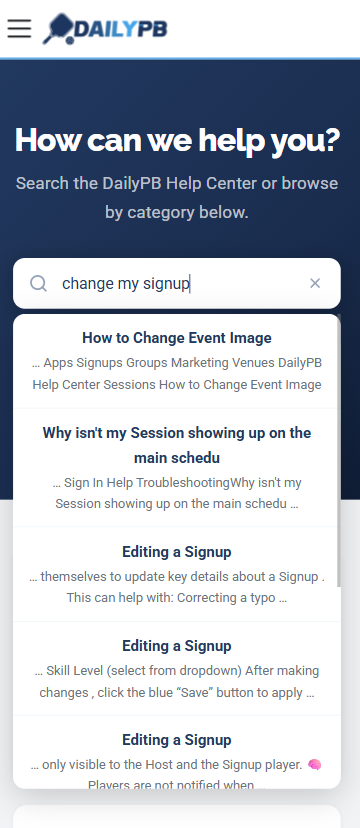
Type anything — the results appear as you type and show the exact sentence where your term appears.
The Questions It Answers Best
The Help Center covers 11 categories: Common Questions, Players, Hosts, Payments, Sessions, Session Apps, Signups, Groups, Marketing, Communication, and Venues. Here are a few of the questions it handles well that used to require a message to me:
- How do I pay for a session? (step-by-step guide here)
- Why isn't my session showing up on the main schedule? (see common questions)
- How do I sign in if I'm having trouble? (sign-in troubleshooting)
- How do I add a co-host to my session?
- How do I set up automatic payments?
If you're a host, this is especially useful for the questions you get from your own players — you can point them directly to the Help Center instead of fielding the same questions over WhatsApp.
When Search Isn't Enough
If you search and don't find what you need, there's a WhatsApp button at the bottom of every Help Center page that connects directly to me. Response time is usually a few minutes during the day.
The goal is that the Help Center handles the majority of questions on its own so that WhatsApp is reserved for the situations that genuinely need a real conversation — not "where's the cancel button."
Search is live now. Head to dailypb.com/help and try it out. If you find an article that doesn't answer your question well, let me know — that's useful feedback for improving the content.
DailyPB is a pickleball session management platform serving players and hosts across the Bay Area. To find open play near you or learn about hosting your own sessions, visit dailypb.com. For a look at how DailyPB got started, read the story behind the platform.