Automatic Payments
With Automatic Payments, players must pay through Stripe to complete their signup, so you never have to chase anyone down for money. You set a price, the player pays at signup, and the funds route to your Stripe account automatically. You keep 100% of the fee you set, and DailyPB is completely free for hosts.
Stripe accepts all major credit cards and also supports Link, Apple Pay, Google Pay, and more.
How do I charge players for my session?
How do I charge players for my session? How do I set a price for my event? How do I collect money for a session? How do I get paid for hosting? How do I charge a fee to sign up? How do I take payment online? How do players pay me? How do I make my session paid instead of free? How do I tell who has paid? What does the Pay button next to a player mean? Where do I see Paid versus unpaid players? Where do I set up automatic payments? How do I enable automatic payments? How do I turn on automatic payments for a session?
To charge for a session, turn on Automatic Payments and set your fee. Once it's on, players must complete payment through Stripe to be signed up. No payment, no signup. This means your roster only ever shows people who have actually paid.
When a payment goes through, the word Paid appears next to the player's name in the Attendees list. Anyone who hasn't paid yet shows a Pay button next to their name instead, which they (or the host) can click to pay.
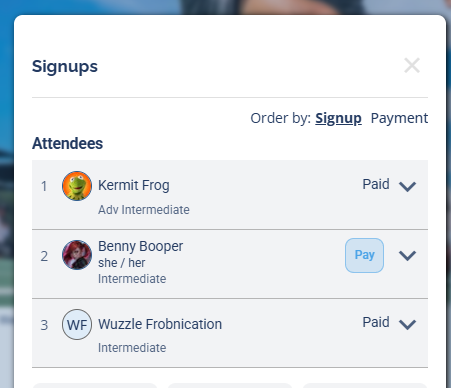
Paid players show a Paid label; anyone who still owes shows a Pay button.
You enable Automatic Payments and set your session fee when you create or edit a session. See Manual vs Automatic Payments to decide which mode fits you, and your Profile → Monetization settings to connect your Stripe account.
What does it cost to use Automatic Payments?
What does it cost to use Automatic Payments? What percent does DailyPB take on automatic payments? What percentage does DailyPB take? How much of a cut does DailyPB take on automatic payments? What are the fees? How much does DailyPB charge? How much does Stripe charge? Who pays the processing fees? Does it cost me anything as a host? How much will the player actually pay? What's the total with fees? Is DailyPB free for hosts?
Players cover all the fees. They're added on top of the fee you set, and you always keep 100% of your fee. There are no subscriptions or hidden costs for hosts; using DailyPB as a host is completely free.
The fees added on top of your session price are:
- Stripe processing fee: 2.9% + $0.30 (Stripe calculates this on the full charged total, so the exact amount is a little higher than 2.9% of your fee alone)
- DailyPB service fee: 5%, with a $1.00 minimum (on a low fee where 5% would be under $1.00, the $1.00 minimum applies, e.g. a $5 fee still carries a $1.00 DailyPB fee)
For example, if you set your Event Fee to $20.00, the player pays $21.94 total to sign up:
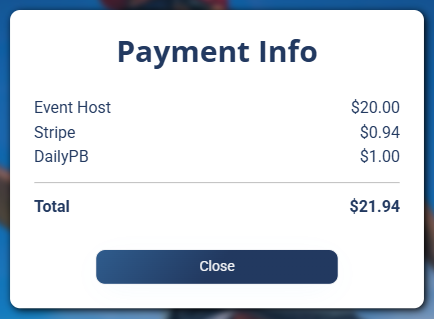
The Payment Info breakdown. Every player can see this before signing up by clicking the ⓘ icon next to the price.
The price on the session shows as "[Your Fee] + fees," and any player can click the ⓘ info icon next to it to see the full breakdown above before they commit.
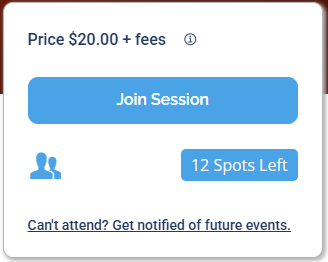
What the player sees on the session: the price plus fees, with an ⓘ icon for the breakdown.
You don't. With Automatic Payments, every fee is paid by the player signing up. The fee you set is what lands in your Stripe account.
How do refunds work with Automatic Payments?
How do refunds work? When does a player get a refund automatically? What is the Refund Deadline? Can I refund someone after the deadline? How much of the payment is refunded? Are the fees refunded too? How long does a refund take to show up?
The Refund Deadline is the cutoff for automatic refunds. It defaults to 48 hours before the session starts, but each host can set their own deadline in their session settings. Whatever the deadline is, the refund policy is shown to players before they sign up.
- Before the Refund Deadline: if a player cancels through DailyPB, the system automatically refunds them to the same method they paid with. It can take 5–10 days to appear on their statement.
- After the Refund Deadline: the system won't auto-refund, but the player can request one from you, and you can issue a refund at any time, even after the deadline.
The standard refund returns the session fee only. The Stripe and DailyPB fees are not included (players agree to this when they sign up). You can optionally refund the fees too through Stripe.
See the Refunds guide for step-by-step instructions on issuing refunds, refunding removed players, refunding after a session is deleted, and returning the fees through Stripe.
Adding players without making them pay (comps & host signups)
How do I add a player without charging them? How do I comp someone a free spot? How do I sign myself up without paying? What does Mark as Paid do when comping a spot on an automatic-payments session? Can I give a free entry? How do I add a guest for free? Why can a host add someone without payment?
Only a Host can add a player without paying for them at the time of signup. (If a non-host user manually adds a player, they must pay for that player for the signup to go through.)
There are a couple of common reasons a host might want to add a player without making them pay:
- Host signups: add yourself to your own session without going through checkout.
- Comped spots: give a free entry to a friend, guest, volunteer, or someone you owe a credit.
When a host adds someone this way, a Pay button appears next to that player's name, which anyone (including the player) can click to pay later.
If you don't want them to pay at all, the host can then optionally Mark as Paid on that player. Their status changes to Paid and the Pay button disappears. No Stripe transaction is created, no money moves, and no fees are collected; it's just a tool to keep your roster clean and accurate.
Why is someone showing as Attending but not Paid?
Why is someone attending but hasn't paid? Why does an attendee show as unpaid with Automatic Payments on? How can someone be signed up without paying? Why isn't a player marked as Paid? An attendee didn't pay, how?
With Automatic Payments on, signing up normally requires payment, but there are a few legitimate ways an Attending player can show as unpaid:
- They came from the Waitlist. A waitlisted player who gets bumped into an open spot is added as an unpaid attendee. DailyPB emails and texts them to let them know they've been bumped and need to pay.
- A host added them manually. Any host can add a signup without paying for them (see comps above).
- They were added before Automatic Payments was turned on. Anyone who signed up while the session was free or manual will show as unpaid once Automatic Payments is enabled.
- The host signed themselves up. Hosts can add themselves without paying, then optionally Mark as Paid on their own name (or anyone else's).
How does the 5-minute checkout hold work?
What is the 5-minute checkout hold? How long do I have to pay during checkout? What happens if I don't finish paying in time? Does my spot get held while I check out? What happens when the last spot is being paid for? Two people signing up at once, who gets the spot?
A player's spot is secured only once payment is completed. To keep things fair, DailyPB gives each player 5 minutes to finish Stripe checkout. If they don't complete it in time (or back out of checkout), the spot reopens and they'll need to sign up again.
When only one spot remains, others see the session marked full, but with a visible indicator that the spot may open back up within 5 minutes. This gives the player in checkout a fair chance to finish.
If two people try to sign up at the same time, the first to confirm is sent to pay. The second automatically sees the option to join the Waitlist instead, no refresh or re-entering info needed. If the first player doesn't finish paying within 5 minutes, DailyPB checks the waitlist and bumps the next person into the open spot.
99% of players complete checkout in 2 minutes or less, so the 5-minute window is rarely a problem.
FAQ
Why did my bank account get a deduction from DailyPB? Why was money pulled from my account? What are the fees for Automatic Payments? Who pays the DailyPB fees? How does Automatic Payments handle refunds from my deposited funds?
Why did my bank account get a deduction from DailyPB? This usually happens when you issue a refund on funds that were already deposited into your bank account. Earnings from signups are deposited automatically (currently each week), so if you refund a player after that deposit, the refund is pulled from the same bank account.
What are the fees for Automatic Payments, and who pays them? All fees are paid by the player, added on top of the fee you set, so you always keep 100% of your fee. There are two fees: the DailyPB service fee is 5%, or $1.00, whichever is greater, and the Stripe processing fee is 2.9% + $0.30, which Stripe charges on the full amount the player is charged. For example, on a $20 Host Fee the player pays $21.94 ($0.94 Stripe + $1.00 DailyPB on top of your $20). Players can click the ⓘ info icon by the price before signing up to see the breakdown.
How do I pay the DailyPB fees? You don't pay any DailyPB fees with Automatic Payments; the player signing up covers them.