Sign In Help / Troubleshooting
Here are troubleshooting steps if you're having trouble logging in to DailyPB, listed in order of most likely to solve your issue.
Troubleshooting steps
Why can't I sign in? I can't sign in. I can't log in. My sign in isn't working. Why can't I sign in to DailyPB? How do I fix login problems? Why won't my account log in? I signed up with Google but can't log in, why? Why does Facebook break my login? How do I know which email I used? Why do I get a sign-in error? Sign in with Google does nothing and sends me back to the home page, why? Why does clicking Google just reload the page without logging me in? Do I sign in with Google or email and password? I forgot my password, how do I reset it? How do I reset my DailyPB password? Did I create two accounts by accident? How do I create a DailyPB account?
1 Refresh your browser
Sometimes the site updates and needs a page refresh. If a regular refresh doesn't work, try a hard reset: on Windows press Ctrl+F5, on Mac press Cmd+Shift+R.
2 Sign in the same way you signed up
Google sign-in and email/password are not interchangeable. You have to sign in the same way you created your account. If you use the wrong one, here's what you'll see:
| How you signed up | How to sign in | What happens if you use the wrong method |
|---|---|---|
| With Google | Use Sign in with Google | Trying email and password shows a message that the account uses Google sign-in (see Step 4). |
| With an email and password | Enter that email and password | Clicking Sign in with Google just bounces you back to the home page without logging you in, and with no error. It looks broken, but you're only using the wrong method. |
3 Open a regular browser if you came from Facebook
Facebook's in-app browser can't complete Google sign-in. Go to dailypb.com in a real browser and sign in with Google there.
4 Reset your password if you forgot it
If you signed up with an email and password and just can't remember the password, click Forgot password? on the sign-in screen and follow the steps to reset it. (This only applies to email/password accounts. If you signed up with Google, there's no DailyPB password to reset, use Sign in with Google.)
5 Try your other email addresses
If you can't remember which email you used (or whether you signed up with Google), enter different email addresses in the Email field to see what message appears:
- If an email isn't in DailyPB, you'll get an error and can't proceed. Try other emails you might have used.
- If you originally signed up with Google but are using the regular sign-in, you'll get an error and can't continue (use Google sign-in instead).
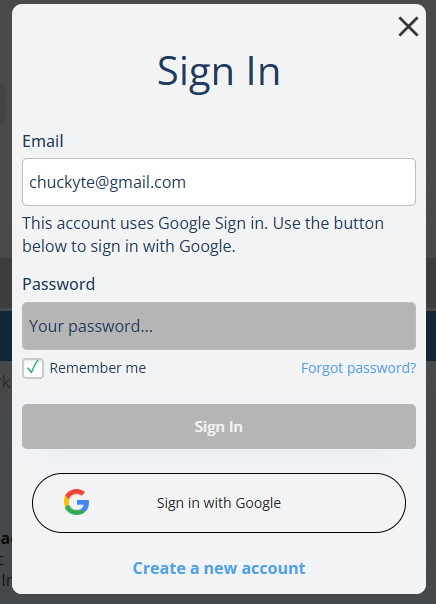
The Sign In window. The "account uses Google Sign in" message appears when an account was created with Google but you tried the regular sign-in.
Still stuck?
How do I contact DailyPB support? Who do I email for help? How do I reach DailyPB if I can't log in? Is there a support contact?
If you're still having issues, contact us:
- Email: chuck@dailypb.com
- WhatsApp: https://bit.ly/chuckt