Creating Recurring Sessions
How do I create a recurring session? How do I create a recurring event? How do I set up a repeating session? How do I make a weekly session? How do I schedule a session that repeats? Do I have to recreate my session every week?
A recurring session repeats on a schedule, so you set it up once and DailyPB keeps generating the sessions for you. It's the opposite of a one-off session, which happens a single time.
The two types of recurring session
What are the types of recurring sessions? Can a recurring session end on a date? Does a recurring session go on forever? How do I make a session repeat until a certain date? What's the difference between recurring indefinitely and recurring until a date?
When you set up a recurring session, you choose between two types:
- Recur indefinitely — it repeats weekly forever, and DailyPB keeps generating new sessions for you automatically.
- Recur until a date — it repeats weekly only up to an end date you pick, then stops on its own.
Either way, DailyPB creates the individual sessions for you, so you set it up once instead of building each session by hand.
How recurring sessions get generated
How do recurring sessions get created automatically? How far ahead do recurring sessions go? Do I have to keep making new sessions? Can I edit one session in a recurring series?
When you create a recurring session, DailyPB lists out individual sessions for the next six months. If it recurs indefinitely, it then refreshes about a month before those run out — picking up from the most recent session and generating another six months — so your schedule always stays roughly six months ahead without any work from you (this keeps going unless you delete it). One set to recur until a date simply generates its weekly sessions up to that date and doesn't refresh.
Each generated session is a real, individual session: you can edit, cancel, delete, or change any one of them on its own without affecting the rest of the series.
A recurring session is different from a one-off session, which is a single standalone session you can schedule up to four months out. For the exact limits, see How Far Out Can I Create a Session?.
Behind a recurring session is an Event — the series that ties all the occurrences together. Each dated occurrence is a session players sign up for. Settings that apply to the whole series (like pricing or templates) are edited across all sessions at once, while a single session's time or visibility can be changed on its own. See Changing the Time or Date of a Session for how to edit one occurrence vs. the whole series.
How to create a recurring session
How do I set up a recurring session? How do I set up a recurring event? Where is the recurring option when creating a session? How do I make a session repeat weekly? Where do I turn on recurring? Where is Advanced Setup? How do I stop a recurring session after a certain date?
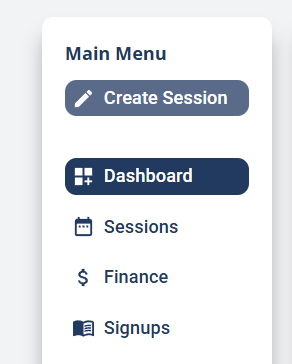
1 Click Create Session
On the host page, click Create Session at the top of the Main Menu.
2 Switch to Advanced Setup
At the top of the Create Session window, choose Advanced Setup. This unlocks the full set of options, including the recurring settings.

3 Fill out the session and continue to the Recurring step
Fill out your session details, clicking Next through each step. The final (sixth) step is Recurring.
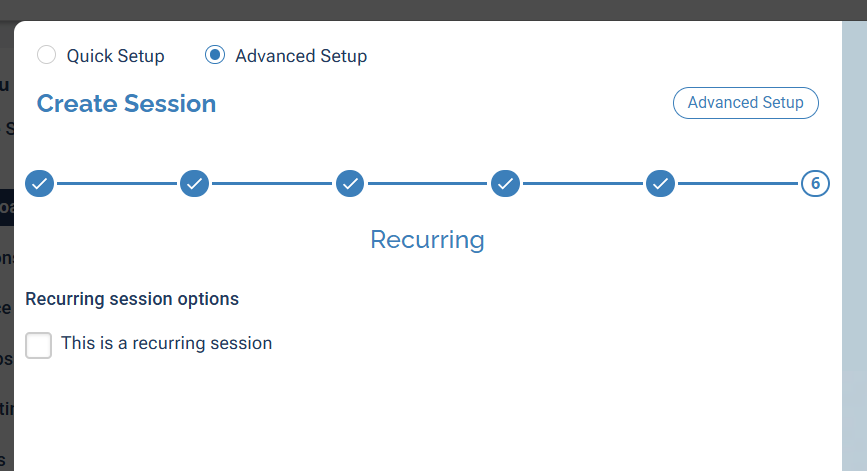
4 Check "This is a recurring session"
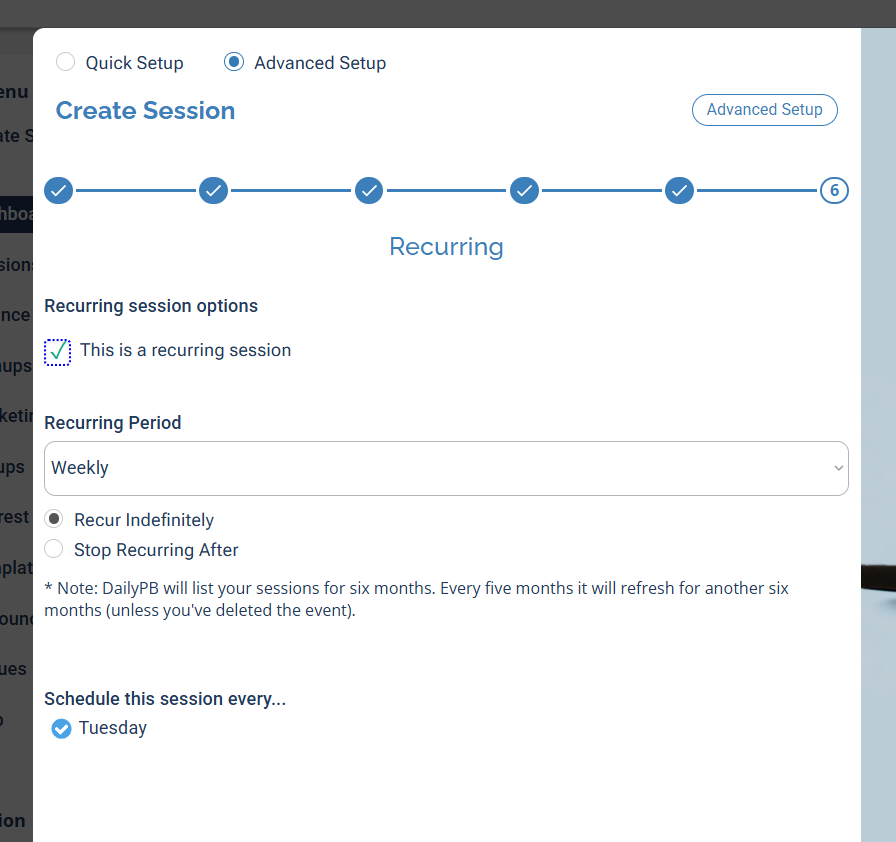
Check This is a recurring session. The Recurring Period is Weekly — it repeats every week on the same day and time as your start date. Then choose how long it repeats:
- Recur Indefinitely — DailyPB keeps generating sessions forever (six months at a time, refreshing about a month before they run out, as described above).
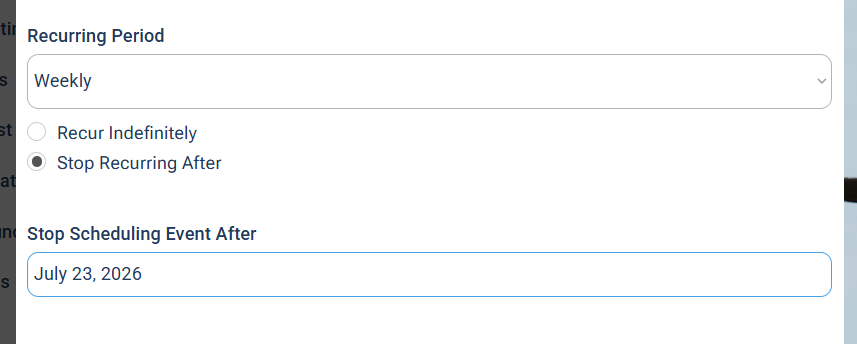
- Stop Recurring After — it runs until a date you pick (see the next step).
5 (Optional) Set an end date
If you chose Stop Recurring After, a Stop Scheduling Event After date field appears. Pick the date — DailyPB will create weekly sessions up to that date and then stop.
Finish creating the session, and your recurring session is live with all its occurrences generated.
A recurring session repeats weekly on the same day and time. If you need a different cadence, create separate sessions for it.
FAQ
Does cancelling a session stop my recurring session? How do I stop a recurring session? How do I make a recurring session stop repeating? Can I edit just one session in a recurring series? What if I add extra sessions to a recurring session? What happens if I delete all the sessions? Will deleting one session break the series?
Does cancelling or deleting one session stop my recurring session? No. Cancelling or deleting a single session leaves the rest of the series intact — it keeps refreshing and generating new sessions as normal.
How do I stop a recurring session from repeating? Delete "this and all following sessions" on one of the sessions. DailyPB will warn you that this ends the recurrence going forward. That's the intended way to turn it off — a single-session delete won't do it. See Delete Sessions or Events for the steps.
Can I edit or cancel just one session in the series? Yes. Every generated session is independent — change its time, cancel it, or delete it on its own without affecting the rest. To edit the whole series instead, see Changing the Time or Date of a Session.
What if I add extra sessions to a recurring session? That's fine and won't affect the recurrence. Adding sessions doesn't change the recurring schedule or create duplicates — the automatic refresh simply picks up where the schedule left off.
What happens if I delete all the sessions? The recurrence ends. Deleting every session in the series effectively closes out the underlying Event, so it won't refresh or generate new sessions anymore.