Direct Session Links
A direct session link takes anyone straight to one specific session, no searching or browsing required. It's the fastest way to share a session by text, email, or social media, and it's the only way to share a private session that isn't listed publicly.
Jump to:
Why use a direct link
Why would I use a direct session link? What is a direct link good for? How do I share a specific session? How do I share a private session? Can people sign up from a shared link? What's the benefit of a direct link?
- Instant access: recipients go straight to the session instead of searching the schedule.
- Easy sharing: drop the link into a text, email, or social post.
- Streamlined signup: players can view the details and sign up right from the link.
- Works for private sessions: a direct link is the only way to reach a private session that isn't shown publicly.
How to get a direct session link
How do I get a direct link to a session? How do I share a session? How do I get the link to a session? How do I copy a session link? Where is the Share Link button? How do I share a session link? How do I get the URL for a session? How do I copy a link to my pickleball session? How do I share a session with another player? How do I get a QR code for a session? How do I download the session QR code? How can someone scan a QR code to see my session? How do I show a session in person?
1 Open the session and click Share Link
Open the session's details popup, scroll to the Quick Actions row, and click Share Link.

Find Share Link in the Quick Actions row on the session.
2 Share it
A Share window opens with a QR code and two buttons. You have three ways to share the session:
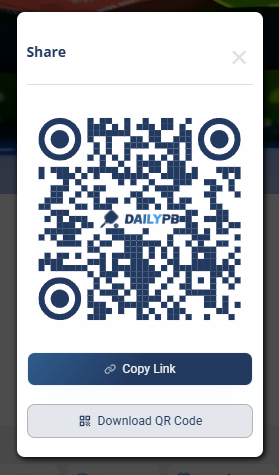
The Share window: copy the link, download the QR code, or show the code in person to scan.
- Copy Link: click it to copy the session's direct link to your clipboard, then paste it into a text, email, or social post.
- Download QR Code: save the QR code image to add to a flyer, post, or printout. Anyone who scans it goes straight to the session.
- Show it in person: if you're with someone, just show them the QR code on your phone. They scan it with their camera and the session opens right up.
The link looks like https://dailypb.com/?session=XXXXX. It's permanent and works as long as the session exists. Anyone with the link can view the session, even a private one, and sign up if spots are open.