Venue Announcements
How do I post an announcement? How do I tell players about a court closure? How do I notify my community when courts close? How do I post a lost and found notice? How do I add a parking update for my venue? What are venue announcements? How do I notify players about something at the venue? Can I put a notice on my venue page? How do I let players know the courts are closed?
An announcement is a short notice you post for a venue: a court closure, a lost-and-found item, a parking change, or any update players should see. Announcements show on the venue page and in the Weekly Court Report email, so they reach the people who play there.
Who can post announcements
Who can create an announcement? Can I post an announcement for any venue? Do I need to be a venue admin? Why can't I create an announcement? Who is allowed to post venue notices?
Announcements can only be created by a Venue Admin for that venue (or a DailyPB global admin). Any admin of a venue can view and edit the announcements posted for it.
How to post an announcement
How do I create a venue announcement? How do I post a court closure notice? Where do I make an announcement? How do I add an announcement with a photo? Walk me through posting an announcement. Where is the Announcements tab in Edit Venue? Can I post an announcement from the venue page?
There are two ways in. The steps below use the Announcements page in the host menu. You can also post from the venue's own Edit Venue editor, on its Announcements tab, which you reach either from the Venues page in the host menu or by clicking Edit Venue on the venue's page. See Managing Your Venue for the editor.
1 Open Announcements
In the host menu, click Announcements. You'll see a list of your existing announcements with their Title, Venue, Start Date, and End Date.
2 Click "New"
Click New in the top right to open the Create Announcement form.
3 Fill in the announcement
- Title (required): a short headline, like "Court Closure" or "Lost Jacket."
- Venue: click Choose Venue and pick the venue this announcement is for.
- Image (optional): add a photo if it helps (a picture of a lost item, a map of the parking change).
- Display Dates: set From and Through dates for how long the announcement should show.
- Body: the details ("North courts closed for resurfacing," "Found a blue water bottle by court 3," and so on).
4 Save
Click Save. The announcement is now attached to that venue and will appear during its display window. The Created by field records your name as the creator automatically.
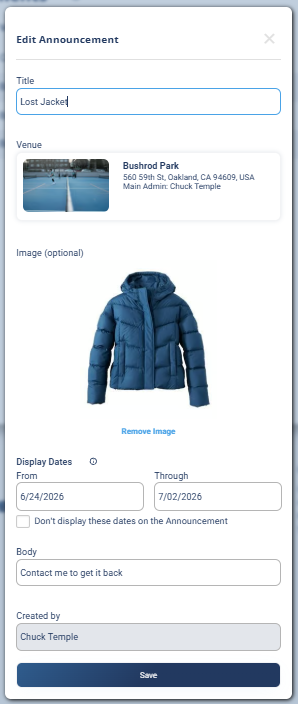
Setting the display dates
How long does an announcement show? How do I set when an announcement appears? Can I hide the dates on an announcement? How do I hide the date range on a lost and found item? Can I set display dates without showing them to players? Do I have to show the date range? What does "Don't display these dates" mean? How do I stop showing an announcement?
The From and Through dates control the window the announcement is visible. Outside that window it won't show.
Display dates are most useful when the notice is tied to specific days, like courts closed for resurfacing from one date to another. For a lost-and-found item, the dates usually don't matter to readers, so you'd typically hide them.
There's also a "Don't display these dates on the Announcement" checkbox. Check it when the dates are just for you (to control when the notice appears) but you don't want the date range printed in the announcement itself, for example a lost-and-found notice where the exact window isn't relevant to readers.
Where announcements show up
Where do announcements appear? Do players see my announcement? Does an announcement go in the email? Where will my court closure notice show? Do announcements show on the venue page?
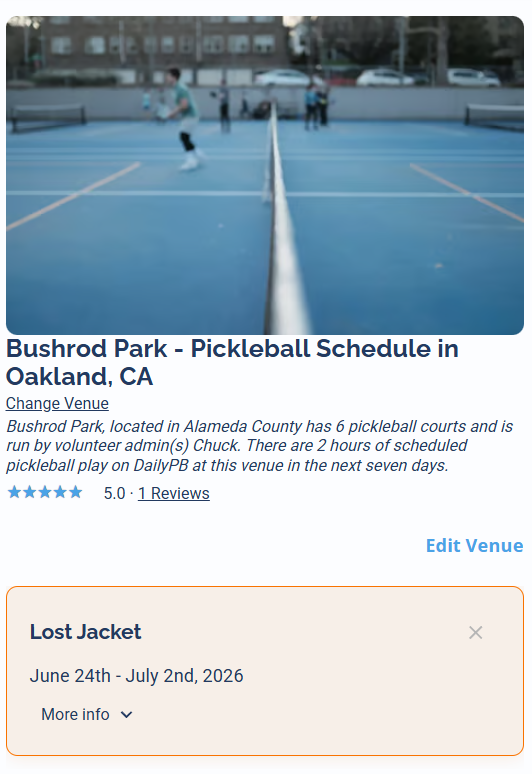
A posted announcement appears in two places, so it reaches players who use that venue:
- On the venue page.
- In the Weekly Court Report email (see How DailyPB Advertises Your Event for more on that email).
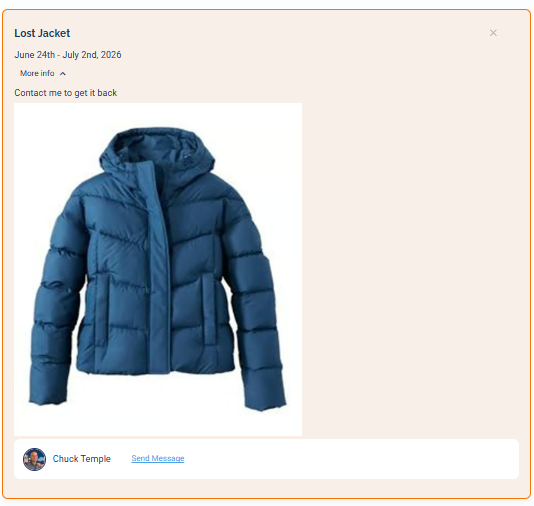
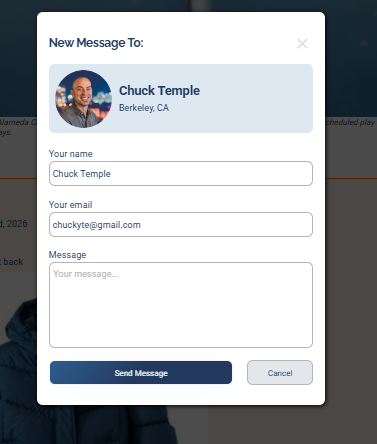
Players can tap More info to expand an announcement and, when the poster has added one, use Send Message to contact them directly, which is how someone reaches you to claim a lost-and-found item.
Letting players dismiss an announcement
How do players hide an announcement? Can a player stop seeing an announcement? What does the x on an announcement do? Why did an announcement disappear for a player? How do I dismiss an announcement? Can I make an announcement go away?
Each announcement has a small x in its top-right corner. If a player has seen it and doesn't need it anymore, they can click the x and that announcement won't be shown to them again, including in their Weekly Court Report. It stays visible for everyone who hasn't dismissed it.
Editing or removing an announcement
How do I edit an announcement? How do I delete an announcement? How do I take down a court closure notice? Can I change an announcement after posting it? How do I stop an announcement from showing?
Open the Announcements page and find the announcement in the list, then open it to change its details. To stop one from showing, set its Through date to a day that has already passed so it falls outside its display window. That takes it off the venue page and out of the email even if the announcement still exists in your list.
More in Venues