Round Robin / Ladder App
Set up Round Robin brackets, record game scores, and view results. The Ladder format lets you create new rounds and move players up or down brackets based on their results.
Jump to:
- Overview
- How to Create a Round Robin
- Recording Scores
- Viewing Results
- Staging the Next Series (Ladders)
- Swapping Players During Play
- Switching Between Series
- Downloading Games for DUPR
- FAQ
Overview
What is the Round Robin app? What is a pickleball round robin? How does the Ladder format work? What's the difference between Round Robin and Round Robin Ladder? How do brackets work in DailyPB? How do I organize structured play for a session?
The Round Robin / Ladder App lets hosts organize structured play. Players are divided into brackets and compete against every other player in their bracket. The Ladder variant builds on this by using results to re-sort players into new brackets at the start of each new series. The app supports up to 96 players across 4 brackets (about 24 players per bracket).
A pickleball round robin is a format where players are divided into groups or brackets, and each player or team competes against every other player or team in their group. A single round robin is usually one bracket of four to eight players. This ensures balanced matchups and lets participants play multiple games against different opponents.
A ladder is a court of four players who all play each other, just like a round robin: three games, then the winners move up to the next court and the losers move down. A ladder is essentially multiple series of round robins run back to back. This app does both, which is why a "series" matters: each series is one round of play, and a ladder strings several together.
There's no difference in how play works between Round Robin and Round Robin Ladder. The only difference is the bracket-setup presets that help you arrange players. Feel free to try both to see which is easier for you.
Video Demonstration
How to Create a Round Robin
How do I create a round robin? How do I set up brackets? How many players per bracket? How do I assign players to brackets? How do I start a round robin in DailyPB? How do I create games? How do I sit a player out (Not Playing)? Can I run a round robin if I'm not a host? Can a player start a round robin? Do I have to be a host to set up a round robin?
Only a host can set up and run a round robin (set up brackets, create games, stage new series, and download results). A non-host cannot create one. Once a host has set it up, any logged-in player can enter scores during play.
1 Open the Round Robin App
In the Signups window (View Attendees), under Session Apps, click Round Robin & Ladders to load the Round Robin page.
2 Choose Your Format
Click either Round Robin or Round Robin Ladder. You can toggle between these two at any time before creating games.
3 Configure Brackets and Players
You will see several new areas on your screen:
Bracket count / players per bracket
Click the numbered buttons to get as close as possible to your desired arrangement. You can fine-tune this later.
- Round Robin: Select the number of brackets.
- Round Robin Ladder: Select the number of players per bracket.
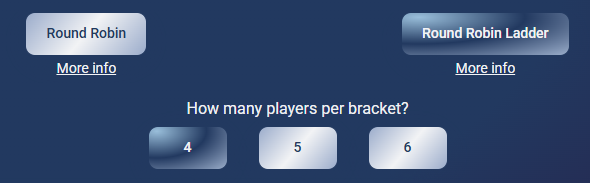
Use the numbered buttons to set how brackets or players per bracket are distributed.
Totals Dashboard

The Totals Dashboard gives you an at-a-glance summary before you create games.
| Field | Description |
|---|---|
| Players | Total number of players in the Round Robin or Ladder |
| Courts | Total courts needed |
| Time | Total time needed in hours (based on 20 minutes per game) |
| Rounds | Total rounds needed |
Brackets
This is where you assign players to brackets. To add a bracket, click Add bracket below the Totals Dashboard.
The top of each bracket shows the current player count and the number of courts needed for that bracket.
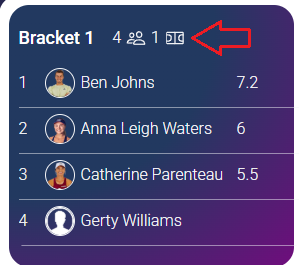
This bracket has 4 players, so it needs just one court.
Drag and drop any player to move them to another bracket. You can also move players to the Not Playing bracket if they are sitting out for a series.
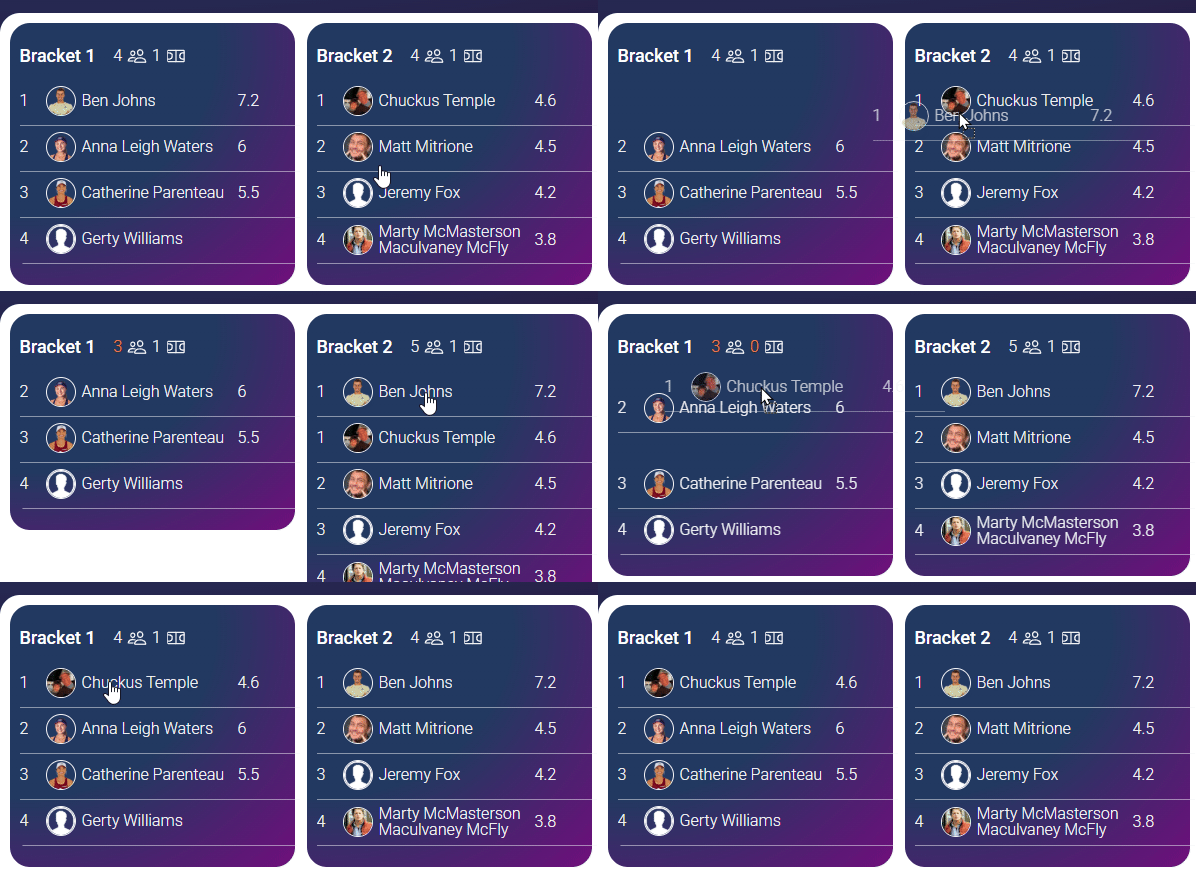
Drag players between brackets or into Not Playing to fine-tune your setup.
4 Create Games
When all players are in the correct brackets, click Create Games.
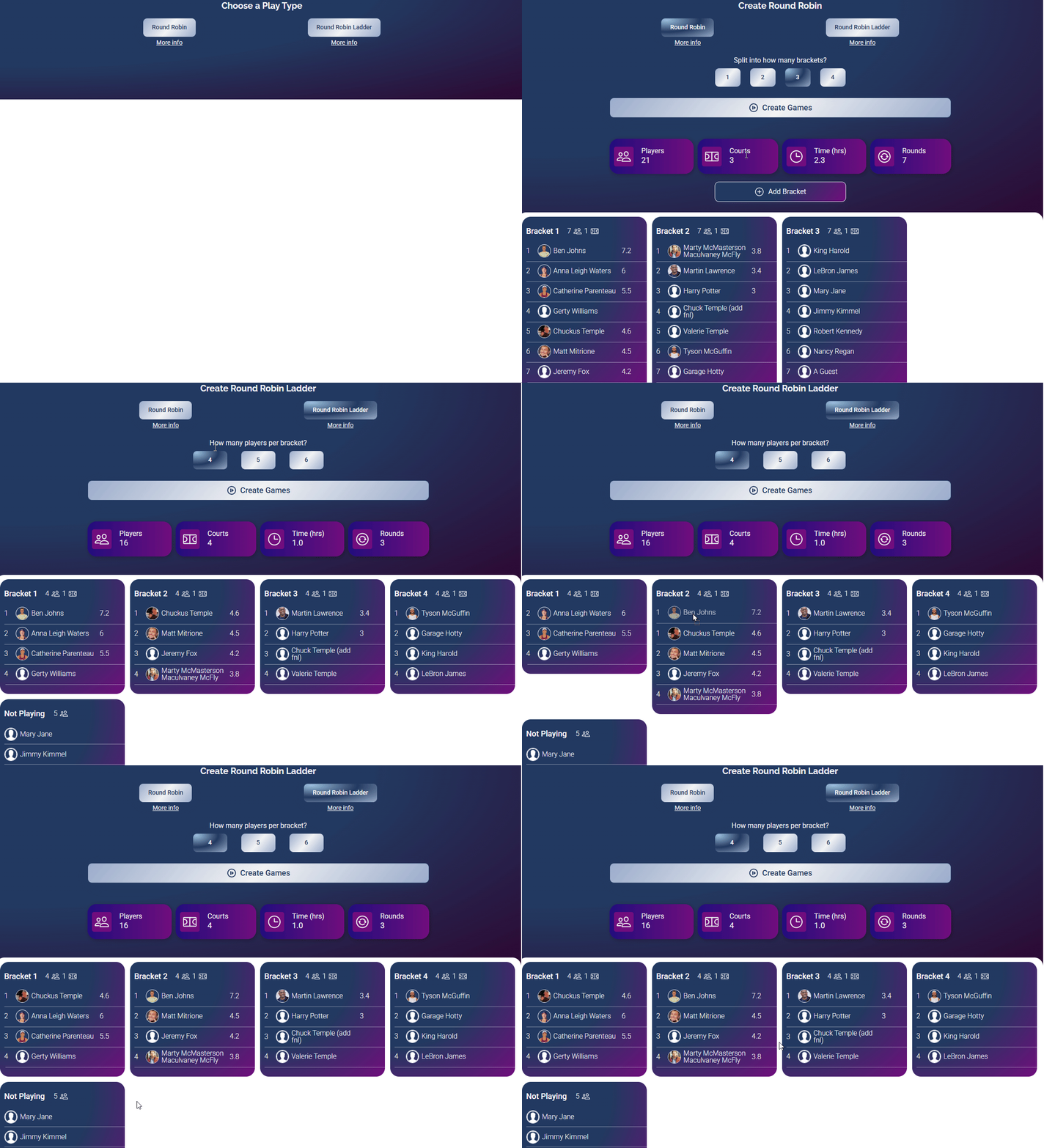
This clip walks through the full setup from opening the app to creating games.
A Round Robin, whether in Ladder format or not, sets up all games so that every player plays each other player within their bracket exactly once.
Recording Scores
How do I record a game score? How do I enter scores in a round robin? How do I save a game? How do I clear or change a score? How do I fix a wrong score? Who can enter scores? How does the Play interface work?
Saving a New Game
To save a new game's score:
- Click Enter Score below the team whose score you want to enter.
- Click the number corresponding to that team's score.
- If the other team has no score yet, you will be prompted to enter it immediately.
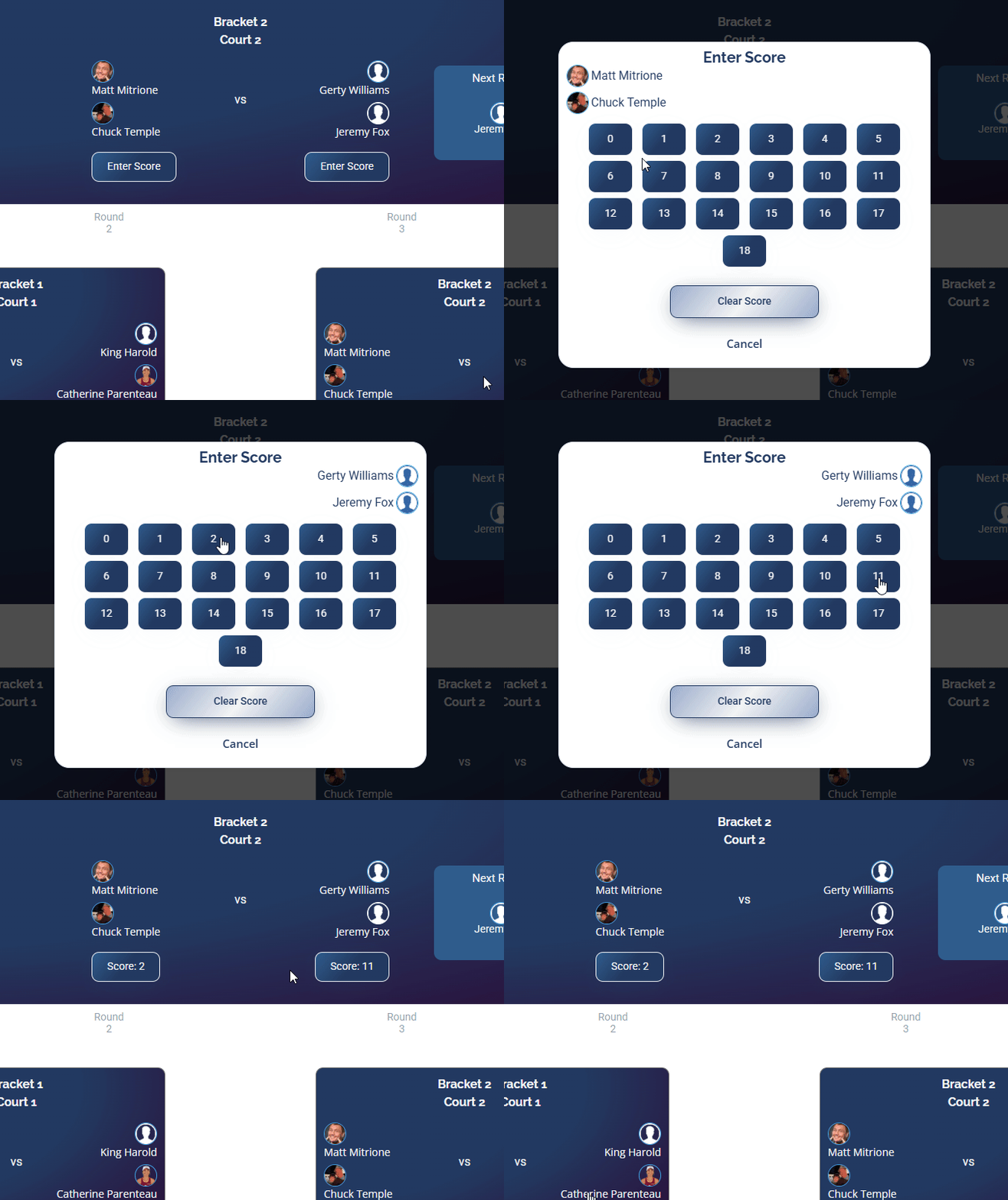
Enter one team's score and DailyPB will prompt you for the other team's score right away.
Clearing a Score
- Click the score you want to clear.
- Click Clear Score.
Changing a Score
- Click the score you want to change.
- Click the new score.
Play Interface (Recording Scores Mode)
While simplicity is the primary goal, the Play interface includes several features to enhance usability.
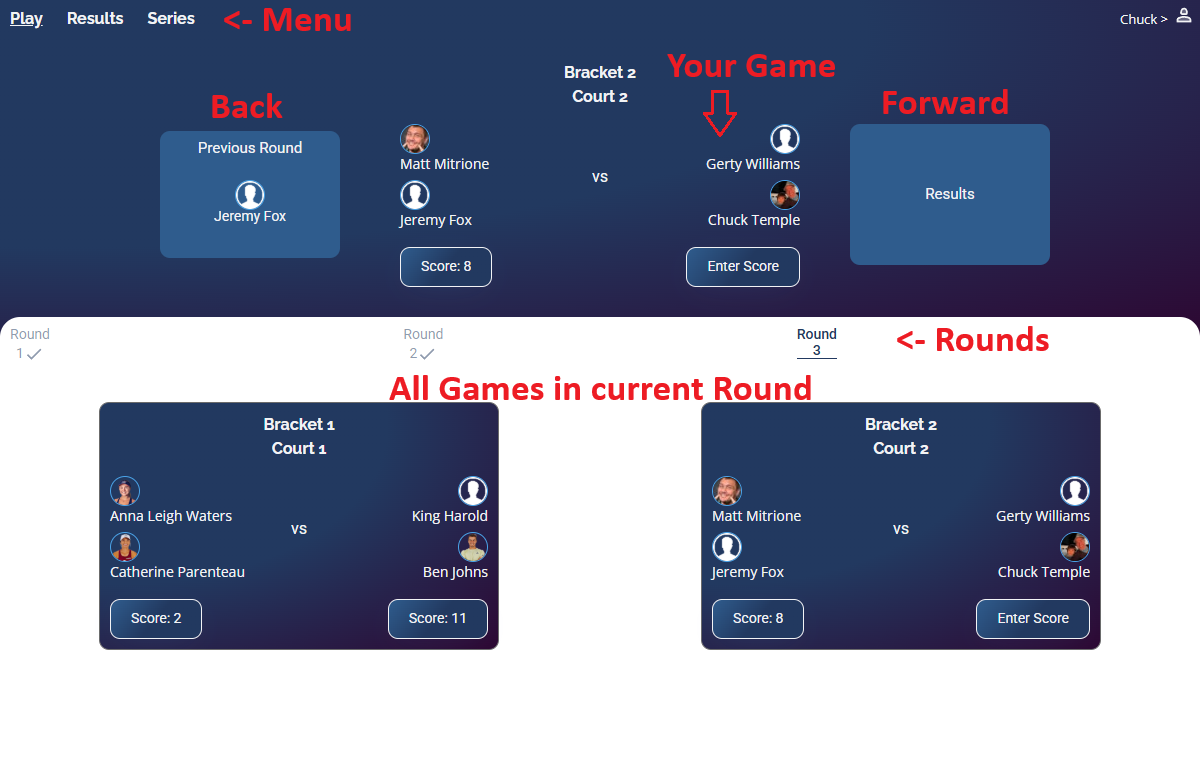
The Play interface gives players and hosts everything they need to track and enter scores.
Menu
| Option | Description |
|---|---|
| Play | Current view. Enter scores, change rounds, and view games. |
| Results | View results. Appears after at least 1 game has been scored. |
| Settings | Manage series, download games for DUPR, and swap players. |
Your Game
This section (blue background, top of screen) shows game information based on your role:
- Players: Shows the game you are currently playing.
- Playing Hosts: Shows the game you are currently participating in.
- Non-Playing Hosts: Shows games from the current round that still need scores. After you enter a score, the next unscored game appears here.
DailyPB examines all games across all rounds and finds the first game (in sequential round order) that does not have two scores recorded. The round containing that game is the current round.
Forward / Back (Desktop Only)
The Forward and Back areas are clickable and let you advance or move back one round. If you are playing, they also display your partner's name or indicate a "bye."
Rounds
Displays all rounds in the current Round Robin. The currently selected round is highlighted in bold. Completed rounds (all games scored) are marked with a checkmark. When the page loads or refreshes, the current round is automatically selected.
All Games in Current Round
Shows all games in the selected round, including the one displayed in Your Game. Any logged-in player can enter scores for any game in this section.
Viewing Round Robin Results
How do I view round robin results? Where are the standings? How are results sorted? How do I see a player's record? Why don't I see results yet? How do I view individual player stats?
Click Results in the top menu to view results for the Round Robin or current series.
Results are displayed by bracket, sorted by:
- Win/loss record
- Average differential (total points for minus total points against, divided by games played)
If you see an incorrect record, click Play, find the game in question, and update the score.
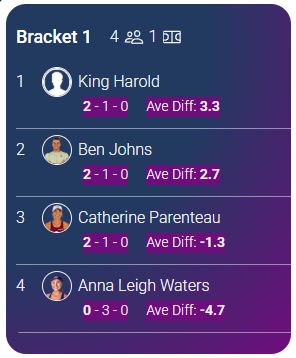
Results are shown by bracket, sorted by record and then average differential.
The Results view will not appear until at least one game has been recorded.
Viewing Individual Player Results
Click on any player to see their individual results:
- Overall record
- Win percentage
- Average differential
- Detailed results for each game, including the bracket and time recorded
If multiple series were recorded in the session, you can view summarized results or navigate between individual series.
Staging / Starting the Next Series (Ladders)
How do I start the next series in a ladder? How do I move players up or down brackets? What does Stage Next Series do? How do I run a ladder across multiple series? How do I see what bracket a player was in last series? What is a ladder series?
This is where the ladder part comes in. A ladder runs multiple series of round robins back to back: after one series finishes, you re-sort players into new brackets (winners up, losers down) and start the next series. Staging a new series is how you set up that next round.
1 Stage the Next Series
From the Results view (hosts only), click Stage Next Series. Your screen will return to a setup view similar to the initial bracket configuration.
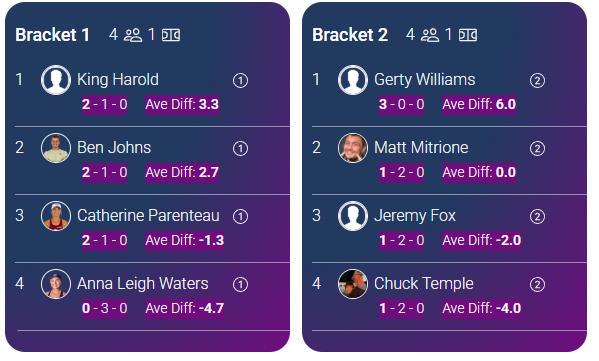
The circled number next to each player's name shows which bracket they were in during the previous series.
2 Adjust Brackets
Move players up or down brackets, add or delete brackets, or move players to the Not Playing list as needed.
The circled number to the right of each player's name shows which bracket they were in during the current series. Use this to decide who moves up or down.
3 Create Games
Click Create Games to set up the next series.
Swapping Players During Play
How do I swap a player during a round robin? How do I replace a player mid-series? Can I swap someone on the waitlist? How do I reverse a swap? What if a player leaves after games are created? Why isn't a player showing up to swap?
Hosts can swap out any player who has not finished any of their games with another attendee who is not currently playing in the same round or bracket.
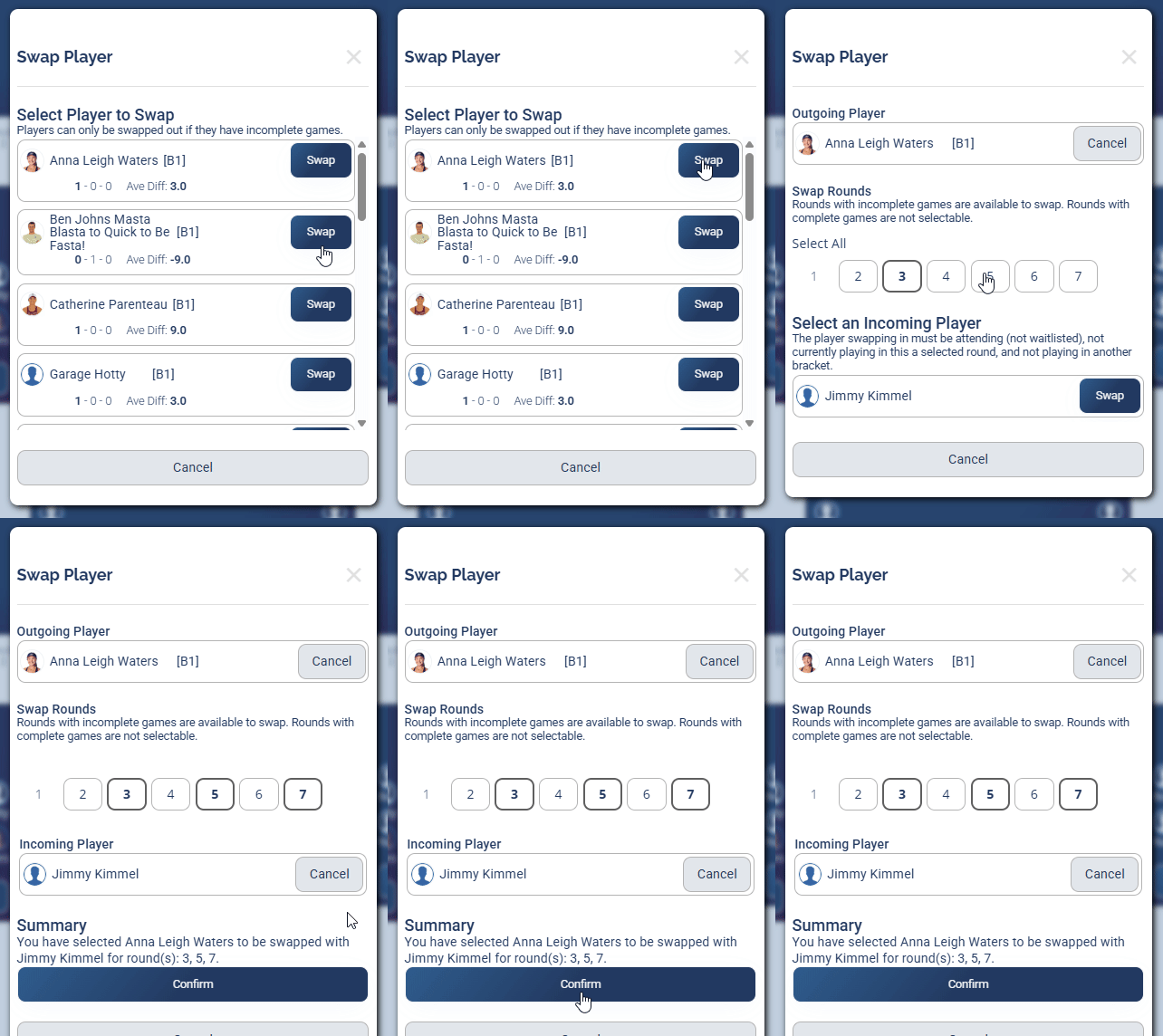
Access the Swap feature from the Settings menu to replace a player mid-series.
1 Open Swap
Click Swap inside the Settings menu.
2 Select the Player to Swap Out
Choose the player you want to remove.
3 Choose Rounds
Select the round(s) in which you want to swap players. Click Select All to apply to all available rounds.
4 Select the Replacement Player
Choose the attendee you want to swap in.
5 Confirm
Click Confirm.
Swapping FAQ
Can I swap someone on the waitlist?
No. You need to add them to the Attendees list before they are available to swap.
Can I swap players for individual rounds or only the entire Round Robin?
Both. You can select which rounds to swap. Click Select All to apply to all available rounds.
What if an attending player removes themselves from the session after games are created?
DailyPB will warn you whenever there are games with fewer than four players. A popup will notify you that a player was removed after games were created and will prompt you to delete all games and recreate them.
What if I need to reverse a swap?
Just repeat the process and swap the original player back in. As long as the original player has not been added to another bracket or swapped for another player in the same round, they will be available to swap back.
What if I need to swap someone who is not yet signed up?
That person must be signed up to the session first. Make sure they are Attending (not Waitlisted).
What if the player I want to swap out is not showing up in the list?
The player likely has no incomplete games. Go to Play mode and review their games. Rounds without a checkmark have incomplete games.
When selecting rounds, why are some rounds missing and others greyed out?
- Missing round: The outgoing player does not have a game in that round.
- Greyed out: The game in that round is complete (both scores entered). Completed games are not eligible for a swap.
Switching Between Series
How do I switch between series? How do I delete a series? Where do I manage multiple series? How do I go back to a previous series?
Click the Settings menu at the top of the screen, then select the series you want to switch to. From the same menu, you can also delete a series (trash can icon) or download all games in DUPR format.
Downloading Games for Uploading to DUPR
How do I download round robin games for DUPR? How do I export scores to DUPR? How do I submit my round robin to DUPR? Where is the DUPR download in the round robin app?
In the Settings menu, click to download all recorded games in DUPR format. You must be a host to access this.
Once downloaded, follow the instructions to upload the file to DUPR.
FAQ
What's the difference between a Round Robin and a Round Robin Ladder? What is the max number of players and brackets? What is a series? Can I swap players mid round robin? Can players enter their own scores or only the host? Can anyone view the round robin?
What is the difference between a Round Robin and a Round Robin Ladder?
A Round Robin has players compete against everyone in their bracket in a single series. A Round Robin Ladder completes a full series, then uses the results to adjust brackets (moving top players up and others down) before starting a new series.
What are the maximum number of players and brackets?
Each bracket supports up to 24 players with a minimum of 4 players. A Round Robin can have up to 4 brackets, for a maximum of 96 players total. If you need more than 96 players or 4 brackets, create a second session.
What is a Round Robin "Series"?
A Series is one complete Round Robin. In a Ladder, after a series finishes a host can move players between brackets before starting a new series. You can navigate and delete series from the Settings menu.
Can I swap players in the middle of a Round Robin?
Not mid-series in the traditional sense. You can use the Swap feature (see above) to replace a player who has not yet finished any games. Alternatively, delete the current series and start over, or record at least one game and then stage a new series from the Results view.
Can anyone enter a score, or only a host?
Both hosts and attending players can add or edit scores. In practice, a few players familiar with DailyPB often take the lead entering scores for others.
Anyone with the link to the Round Robin can view the details but cannot edit anything.
More in Session Apps