General Payment FAQ
Does a host need to pay to sign up for their own session?
Does the host have to pay for their own session? Do I pay to join my own session? Can I sign myself up for free? Does the host pay the fee on their own signup? Do hosts pay for Automatic vs Manual sessions?
- Automatic Payments: No. Hosts can sign up without paying. On the signup confirmation screen there's an And Pay for Session checkbox. When you register for your own session it's automatically left unchecked, so you're added without going through checkout. (Only hosts can uncheck it; other players must keep it checked and pay to sign up.) After signing up, you can optionally Mark as Paid on your own name.
- Manual Payments: Yes. If you sign up for your own session, the standard DailyPB fee is assessed for that signup (the fee is based on attendee count at session start).
What's the best link to send an unpaid player to pay?
What link should I send to unpaid players? How do I ask someone to pay? What's the best payment link? What link do I send a player to pay after they sign up? Should I send a direct payment link? Where do I point an unpaid player to pay?
The best approach is to send them a link to the session itself, which is included automatically in DailyPB's text messaging tool. When the player is logged in, they'll see a Pay Here button right on the session popup.
Avoid sharing individual payment links, since each one is uniquely tied to a specific signup and contains extra user information.
They're not logged in. A Pay Here button only appears when the player is signed in to the account they used to register. If they can't find it, have them log in first (and double-check they're using the same account / email they signed up with).
Can I set up a series with a one-time payment?
Can I charge once for a whole series? Is there a one-time payment for recurring events? Can players pay once for all sessions? Do I have to charge per session? Is there a package or subscription price? How do I charge one payment for a recurring series? What's the workaround for a one-time series payment? Can I pre-sign up players for a series after they pay once?
There isn't a built-in way to charge a single payment that covers an entire recurring series, but there's a common workaround.
Create the first session (or a dedicated signup session) with the payment on it, and have players pay for that one. Then manually sign up those same players for the rest of the sessions in the series. Because you're adding them yourself, they're already signed up and marked as paid for those later sessions, so they only ever make the one real payment up front and the rest are handled manually.
Do players get a receipt when they pay?
Do I get a receipt when I pay for a session? Where is my receipt? Can I get a receipt for my session payment? Does DailyPB send a receipt email? How do I get proof of payment for a session? Is there a confirmation email when I pay?
Yes — when a player pays through Automatic Payments, they receive a receipt email for the payment.
Manual payments (Venmo, cash, and so on) are collected outside DailyPB — DailyPB only tracks them, it never moves the money — so there's no DailyPB receipt for those; your record is with however you paid.
Do I need to set up payments for free sessions?
Do I need payment setup for a free session? Can I use signups without payments? Do free sessions need Stripe? Do I have to set up Monetization for a free session?
No. You don't need to set up any payment options for free sessions, even if you want to use signups.
How do I check whether I have Manual or Automatic Payments enabled?
How do I check my payment settings? Where do I see if Automatic or Manual Payments is on? How do I find my Monetization settings? How do I know which payment mode I'm using? Where do I enable payments or view my earnings?
Click your name in the top-right to open your profile, then click Monetization. Under Get Paid for Hosting you'll see the status of both Automatic Payments and Manual Payments. This section also lets you enable either type, adjust your settings, view your earnings, and manage your accounts.
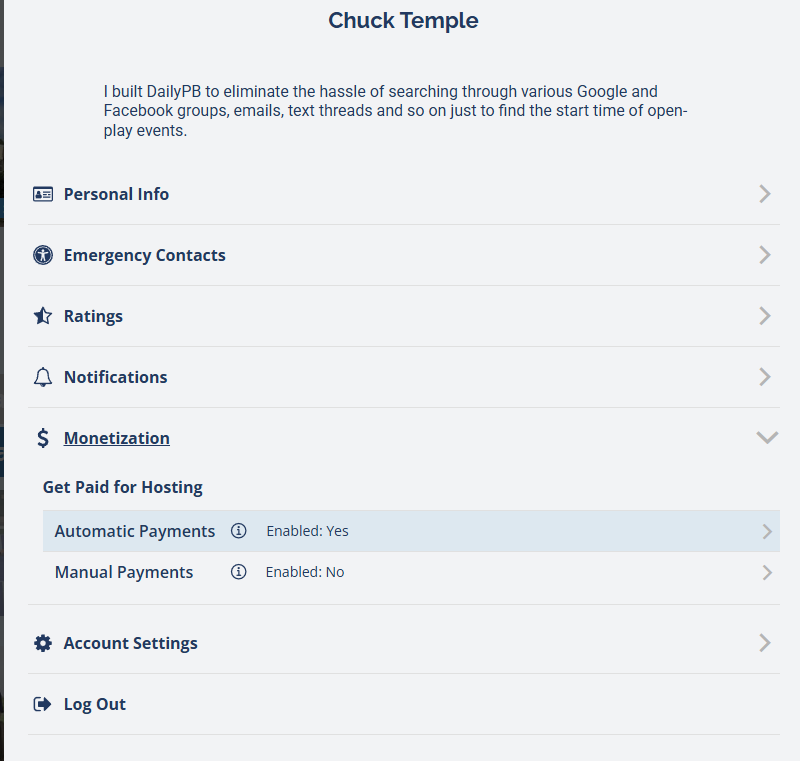
Profile then Monetization, to see and change which payment mode is enabled.
A player paid for the wrong person. What do I do?
A player paid for the wrong person, what do I do? Someone accidentally paid for another player, how do I fix it? A player overpaid, what do I do? Did someone pay twice for my session? How do I refund a payment made for the wrong player? Someone paid for the wrong signup. How do I tell who actually paid for a signup? What's the difference between Payer and Signup Name? How do I check a transaction in the Finance tab? Where do I see who paid versus who's attending?
A player can't actually overpay or pay twice, since they can't change the price and the system won't charge the same signup again. What usually happens is that a player accidentally pays for a different player (for example, they pay for someone else's signup instead of their own).
To get to the bottom of it, open the Finance tab and click the transaction. The Payment Transaction Details panel shows both a Payer and a Signup Name:
- The Signup Name is who's attending (whose spot the payment is for).
- The Payer is who actually paid.
If those two names are different, someone paid for the wrong person. In that case, just refund the payment, and the right player can then pay for their own spot.
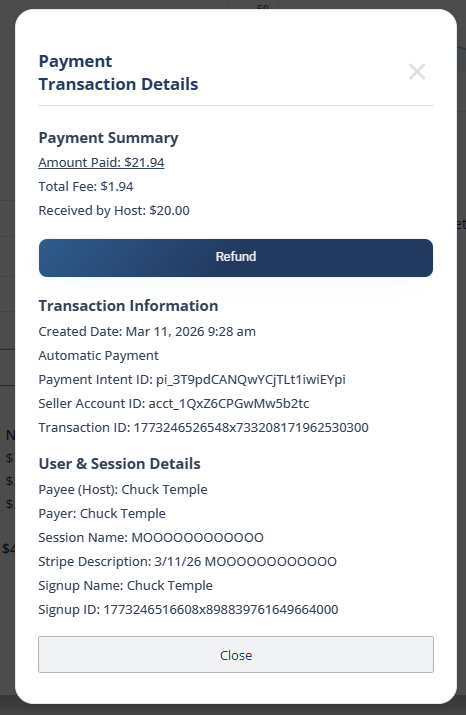
In Transaction Details, compare Payer to Signup Name. If they differ, the payment was made for the wrong person.
To refund it: for an automatic (Stripe) payment, click Refund right on this panel, or refund from the session's attendee actions (this works even after the session has ended). Full steps and what the player receives are in Refunds.
For a manual payment (Venmo, cash, and so on), DailyPB only tracked the payment, it never moved the money, so settle it with the players directly however you collected it and update their paid status if needed.
The Finance tab shows the real money in and out for your sessions, and clicking any transaction opens these details. For automatic (Stripe) payments, you can also log in to your Stripe dashboard to see exactly which payments came in.