How to Create a Direct Payment Link
When you're using Automatic Payments, you can generate a direct Stripe payment link for a specific player. This is useful when you want to send one person a link to pay for their own signup. Anyone can create the link by clicking Pay next to a player's name, letting the Stripe Checkout page load, then copying the URL.
How to create a direct payment link
How do I create a direct payment link? How do I send a player a link to pay? How do I generate a Stripe payment link for one player? How do I get a payment URL for an attendee? How can someone pay without logging in? How do I send a pay link? Where is the Pay button next to a player? How long is a Stripe payment link good for? Why did my payment link stop working? Do direct payment links expire?
1 Open the session and view attendees
Open the session details and click View Attendees to open the Signups panel.
2 Click "Pay" next to the player
Find the player you want to generate a link for. Players who still owe show a Pay button next to their name (players who have already paid show a Paid label instead). Click the Pay button.
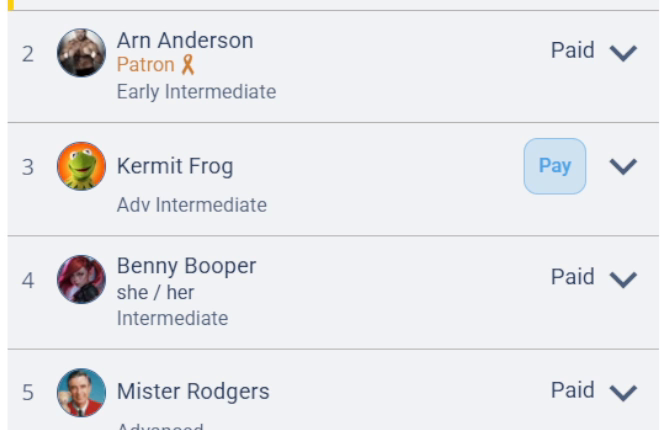
Click the Pay button next to the player who still owes for their signup.
Each payment link is tied to one specific signup, so make sure you've selected the correct attendee before generating it.
3 Copy the Stripe Checkout URL
Once the Stripe Checkout page loads, copy the URL from your browser's address bar. That URL is the player's direct payment link.
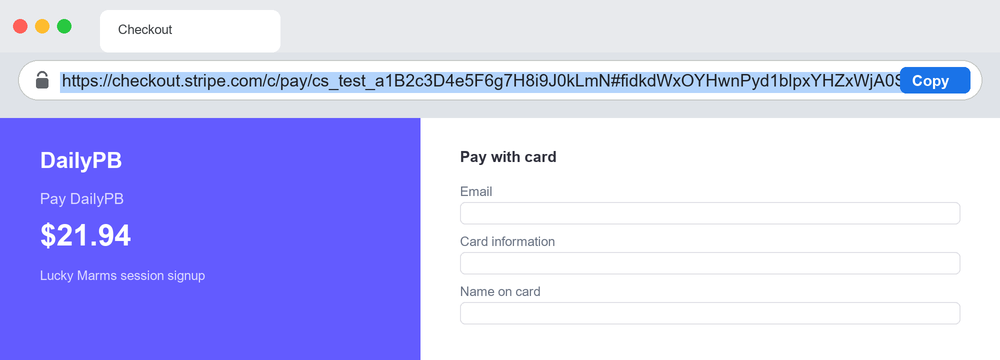
Copy the full checkout.stripe.com URL from the address bar. This example is illustrative; your real link will have its own unique code.
You can now share this link with the player. When they open it, it takes them straight to the Stripe Checkout page to pay for their signup.
A Stripe Checkout link is usually good for about 24 hours. If an old link has stopped working, just generate a fresh one with the same steps.