Fixed Partner Round Robin
A fixed partner round robin is run on a team session. Each team is a locked pair of partners, and every team plays every other team once. You set it up and run it entirely from Host Tools. This guide covers generating the schedule, entering scores, reading the live standings, exporting for DUPR, and swapping a player mid-round.
The fixed partner round robin lives inside a team session. If you haven't created one yet, see Team Events first. Looking for the individual-player format where each person is sorted into a bracket and plays everyone in it? That's the separate Round Robin / Ladder App.
How to open the fixed partner round robin
How do I start a fixed partner round robin? Where is the team round robin? How do I open the round robin for a team session? Where is the Round Robin button in Host Tools? How do I set up a round robin for my teams? Do I have to be a host to run a team round robin? Can a player start the round robin?
Only a host can set up and run the round robin. Open the team session, click Join or Create Team, then open the Host Tools tab. Scroll to the Tools section and click Round Robin.
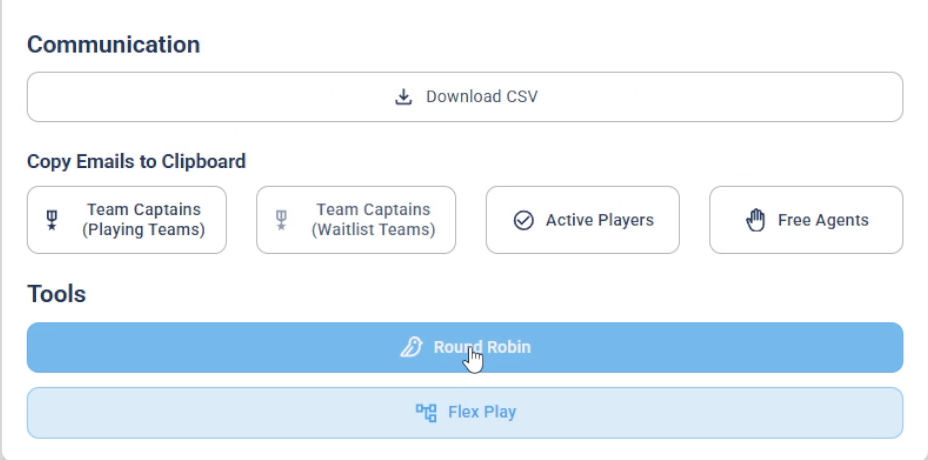
Under Tools in Host Tools, click Round Robin to open the round robin page.
Setting up the round robin, generating games, submitting scores, exporting to DUPR, and swapping players are all host-only actions. Anyone can enter a score during play, but only the host can submit it to lock it in.
Set up and generate the games
How do I generate games for a team round robin? What do the totals mean on the round robin page? How many rounds will my round robin have? How do I turn on DUPR game mode? What are brackets in a round robin? Can I split teams into brackets? What happens if I have an odd number of teams? What is a bye in a round robin? How does DailyPB calculate courts and playing time?
The round robin page opens on the Settings tab. At the top it shows the totals it calculated from your teams: Total Teams, Total Rounds, Total Courts needed, Total Playing Time (based on 20 minutes per game), and Total Players. With 8 teams, for example, you get 7 rounds so every team plays every other team once.
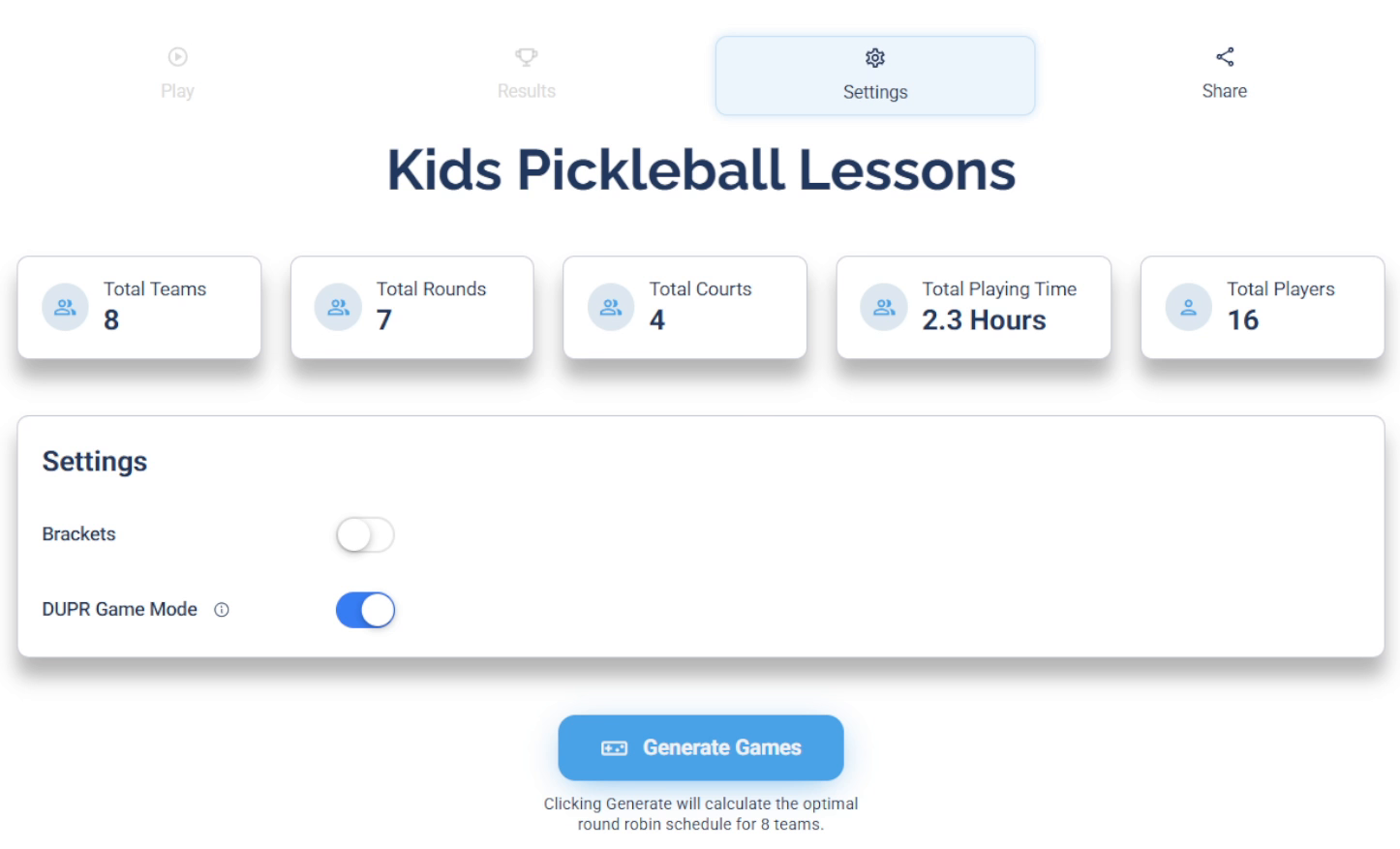
The Settings tab summarizes the schedule and holds the Brackets and DUPR Game Mode toggles.
There are two optional settings before you generate:
- Brackets — turn this on to split your teams into named groups (for example, an A bracket and a B bracket for a field of eight). Assign each team to a bracket in the Teams Roster below. Results are then segmented by bracket.
- DUPR Game Mode — turn this on when you plan to submit results to DUPR. It enforces DUPR's scoring rule so your games are valid for upload.
With DUPR Game Mode on, a game can't be a tie and one team must score 6 points or more for the game to count as DUPR-compliant. You'll still be able to submit a non-compliant score, but DailyPB warns you (see Enter and submit scores).
If you have an odd number of teams, one team gets a bye (sits out) each round. DailyPB handles this automatically when it generates the schedule.
When your settings look right, click Generate Games. DailyPB builds the full schedule round by round, then automatically drops you onto the Play tab.
The Play and Results tabs are greyed out until you generate the games, because there's nothing to play or score yet. After you generate, you can still return to Settings to delete the round robin or change the DUPR Game Mode.
Enter and submit scores
How do I enter a score in a team round robin? How do I submit a score? Why can't I submit a score? Who can submit a round robin score? Do I have to be the host to submit a score? Can players enter their own scores? Why didn't the standings update after I entered a score? What is the DUPR compliant warning in the round robin? Why does it say DUPR games require at least one team to score 6 points? How do I record results for each round?
On the Play tab, the round tabs across the top let you jump between rounds.

Click a round tab to jump to that round.
Below the tabs, a progress bar shows how many games in the selected round are complete. It updates as each game is submitted.

The progress bar tracks how many of the round's games have been scored.
Each game card below lists the two teams and their partners. To record a game, click the score circle at the right of a team's row and pick that team's score, then do the same for the other team. When both scores are in, click Submit Score.
Anyone can enter a score, even without a DailyPB account. But only the host can submit it to lock it in, so that the round's progress bar climbs and the standings update.
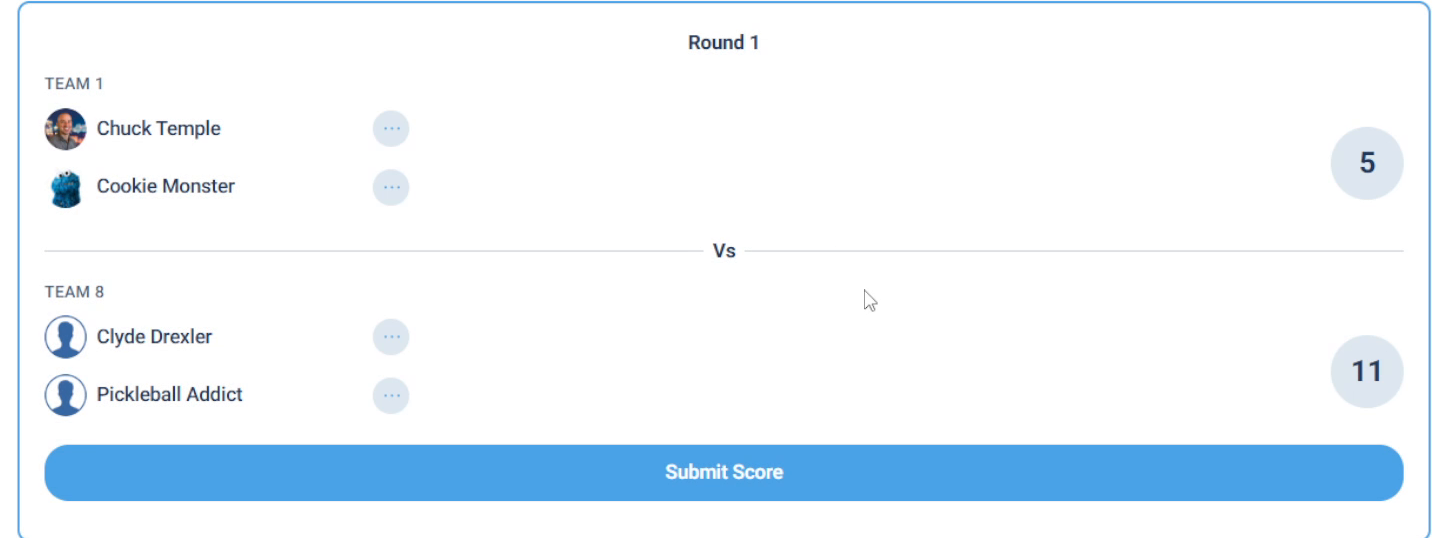
Enter both teams' scores, then click Submit Score to record the game.
Entering a score is open to anyone, but submitting (locking it in) is host-only. Until the host submits, the score isn't recorded, the progress bar doesn't move, and the standings don't change.
If DUPR Game Mode is on and a score isn't DUPR-compliant (a tie, or neither team reached 6), DailyPB shows a warning on the game card. You can still submit it, but it won't count for DUPR.
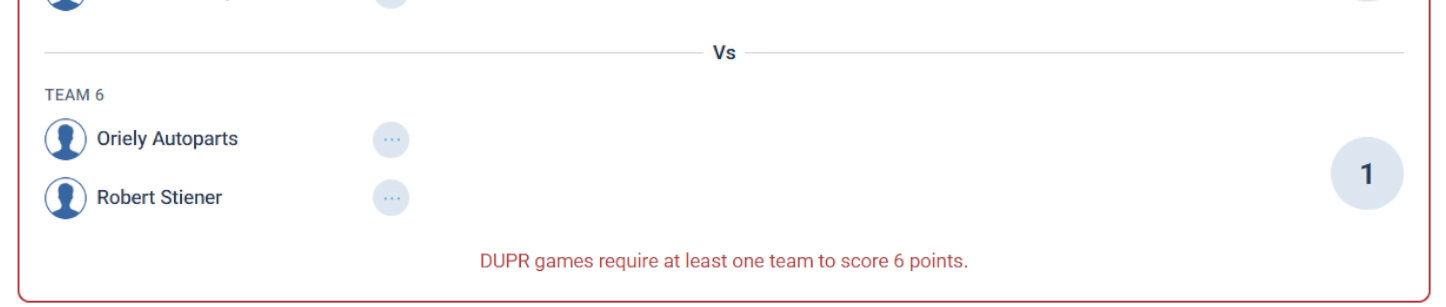
A non-compliant score is flagged in red but can still be submitted.
Once every game in a round is scored, that round tab turns blue so you can see at a glance which rounds are done. Refreshing the page jumps you to the current round: the first round that still has an incomplete game.
View the live standings
How do I see round robin standings? Where are the team results? How are teams ranked in the round robin? What do Ave Diff and Total Diff mean? How do I sort the standings? Why is one team ranked above another with the same wins? Can I sort round robin results by points scored? How are ties broken in the standings?
Click the Results tab to see Live Standings. Every column updates instantly as scores come in: Wins, Loses, Ties, Win %, Ave Diff (average point differential), Total Diff, Pts Scored, Pts Scored Against, and Total Games. If you turned on brackets, the standings are segmented by bracket.
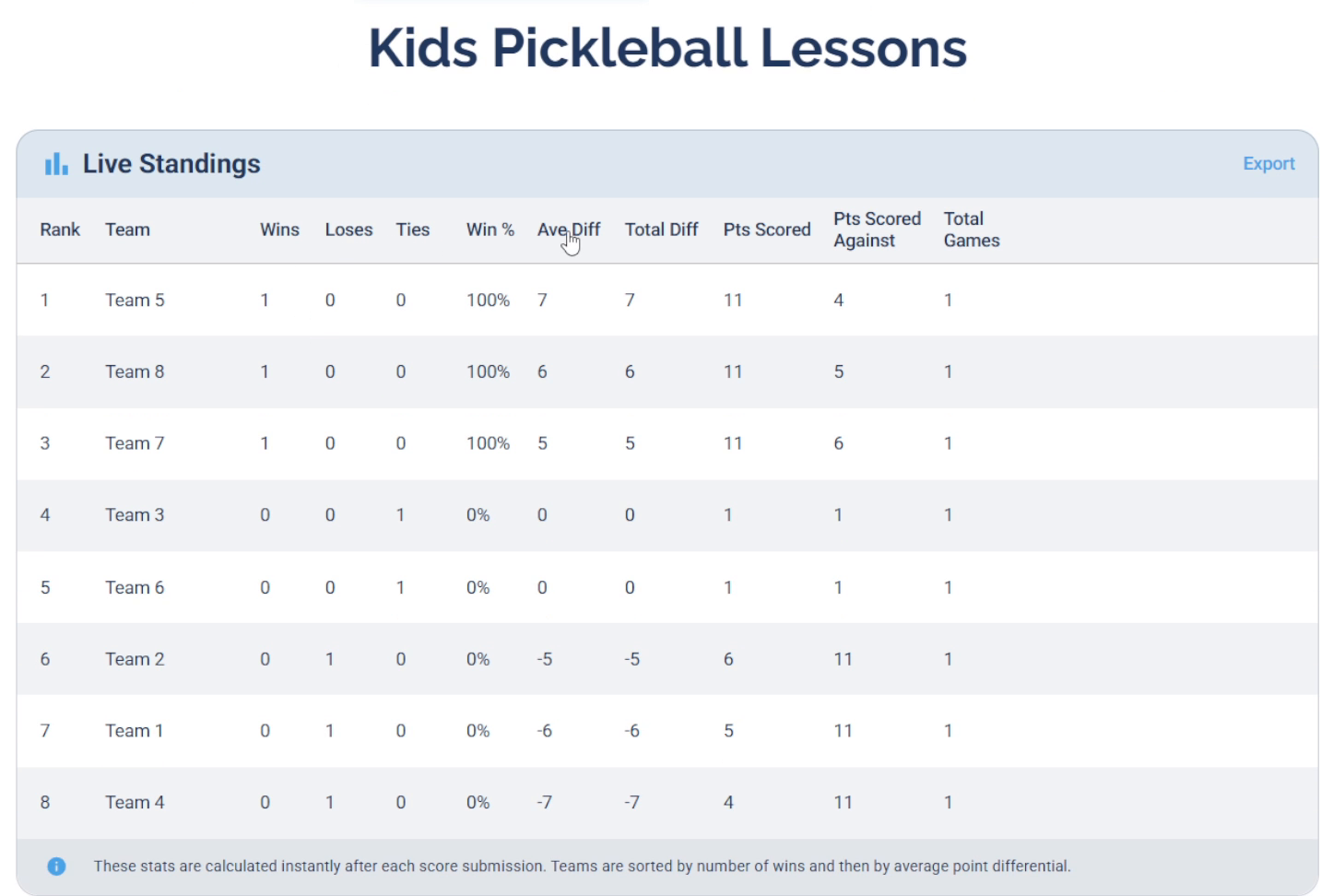
Live Standings rank teams by wins, then average point differential.
By default, teams are sorted by number of wins, then by average point differential as the tiebreaker, so a team edges out another with the same record when its average differential is higher. Click any column header to re-sort by that column, and click Reset to return to the default sort.
These stats are calculated instantly after each score submission, so the standings are always live.
Export results for DUPR
How do I export a team round robin to DUPR? How do I download round robin scores for DUPR? Where is the DUPR export in the round robin? How do I get the DUPR spreadsheet from a team session? How do I upload team round robin results to DUPR?
On the Results tab, click Export in the top right of the Live Standings card. DailyPB downloads a CSV already formatted for DUPR, so you can import it straight into your DUPR club.
Once you've downloaded the CSV, follow the instructions to upload the file to DUPR.
Swap a player mid-round
How do I swap a player in a team round robin? Can I replace a player who got hurt during a round robin? Can I swap in someone who isn't in the session? Do I have to be signed up to be swapped into a round robin game? Does a swap apply to future games too? How do I swap a player for every remaining game? What happens to the results when I swap a player? Will a swapped-in player show up in the DUPR export? Why isn't the DUPR ID filling in when I swap? How do I enter a DUPR ID for a swapped-in player? Can I swap in a player who has a bye?
If a player can't finish (say they get hurt), you can substitute someone else for a game. On the Play tab, go to the game, click the ⋯ menu next to the player you want to replace, and the Swap Player window opens.

Click the ⋯ menu next to the player you want to swap out.
Search for the replacement by name under Search for DailyPB User. When they appear under Swap with this User, click Select, then click Swap.
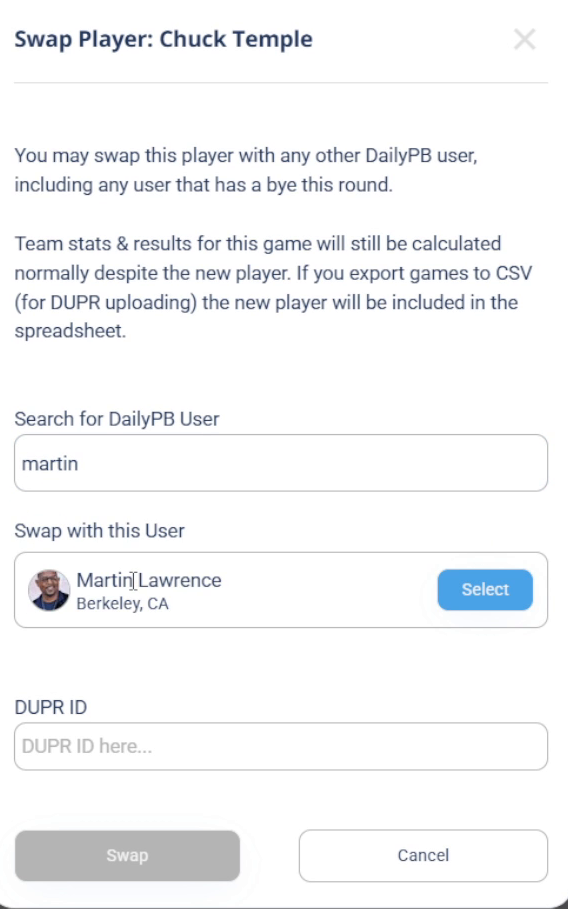
Search for any DailyPB user, click Select on the match, then click Swap.
Swapping a player only affects the single game you're in, not their other games. If you need the substitute in for every remaining game, repeat the swap on each game individually.
You can swap in any DailyPB user — they don't have to be signed up for the session. That includes a player who has a bye this round, so if you have an odd number of teams you can bring in whoever is sitting out.
The DUPR ID field only appears if the session is a DUPR session. When it appears, DailyPB fills in the swapped-in player's DUPR ID automatically if they have one saved in their profile. If they don't, the field stays blank and you'll need to find and enter it yourself. In a pinch you can type any number — the field isn't validated, so it won't check that the DUPR ID is real.
Team stats and standings are still calculated normally for the team after a swap. And because the export has to be accurate per game, the swapped-in player is included in the DUPR spreadsheet for the game they played.