Team Events
A Team Event lets players sign up as teams instead of individuals, great for MLP-style play, leagues, and tournaments. This guide covers creating one as a host. For the player side (joining teams, recruiting, free agency), see the linked player guides below.
How to create a Team Event
How do I create a Team Event? How do I set up a team event? How do I make players sign up as teams? How do I run an MLP event? How do I set the number of teams? How do I set players per team? How do I charge per team? What happens if more teams sign up than my maximum? Do extra teams go on a waitlist? How many players can be on a team? How many players can play per session?
1 Start a new session and choose Team Event
Go to your Host Dashboard and click Create Session. In Basic Info, set Type of session to Team Event.
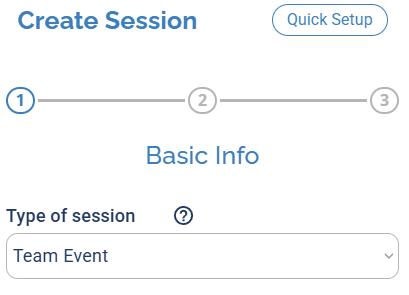
Choose Team Event from the Type of session dropdown.
2 Fill in the rest of the session as usual
Continue through the session setup the way you normally would: name, venue, date and time, and anything else you'd set on a regular session.
3 Set your team options
This is the one part that's different from a regular session. In the Signups step, Enable Signups is checked automatically. Here you set:
- Maximum number of teams allowed in the session.
- Players per team (e.g., 2 for doubles, 4 for MLP format).
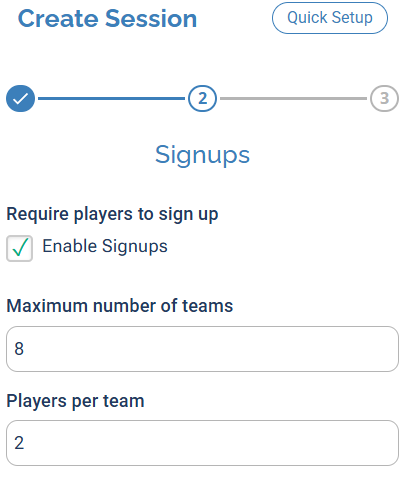
Set how many teams can play and how many players are on each team.
If more teams sign up than your Maximum number of teams, the extra teams are added to a waitlist automatically.
A team can have as many players on its roster as it wants, but only the number you set in Players per team can be active (playing) for the session. The rest sit on the team's bench.
Pricing works just like a regular session, with one thing to know: the price you set is charged per team, not per individual player.
4 Finish and save
Finish the rest of the setup as you normally would, then click Save & Close. Players can then Join or Create Team from the public session listing.
Joining a team doesn't automatically put a player in the session. They start on the team's bench and a captain has to move them into the active lineup. This two-step trips people up, so point your players to the guides below.
For players: joining and recruiting
How do players join a team event? How do players create a team? How do players sign up for a team event? How does free agency work? How do captains recruit players? Where do players become a free agent?
Once your Team Event is live, players manage teams themselves from the event page. Point them to these guides:
- How to create a team and add yourself to a session: creating a team and getting into the active lineup.
- Adding teammates: how captains add players to their team.
- How to become a free agent: how players without a team list themselves for captains to recruit.