The Host Dashboard
What is the host dashboard? Where do I start as a host? What does the dashboard show? How do I see my upcoming sessions? Where do I see recent signups? How much money have I made this week? What is the host home screen?
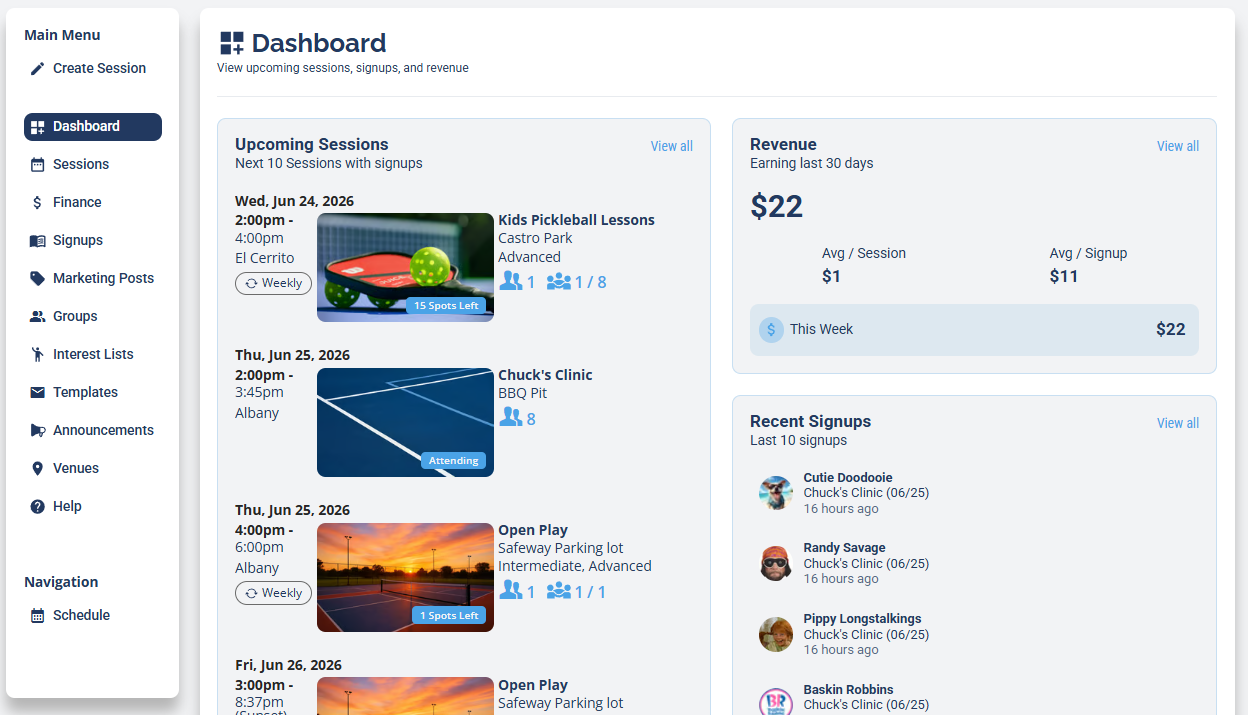
The Dashboard is your home base as a host. It gives you a quick read on what's coming up, who just signed up, and how your revenue is doing, with links into the deeper tools. Open it from Dashboard in the host menu.
Upcoming sessions
Where do I see my upcoming sessions? How do I see my next sessions and their signups? Where are my sessions with signups? How do I see who's coming to my next session? How do I view all my upcoming sessions? How do I manage a session from the dashboard? How do I open a session from the dashboard?
The Upcoming Sessions panel lists your next sessions that have signups, with the date, time, venue, session name, and how many players are signed up. Click View all to open the full Sessions view, or click a session to open it and manage it (see Creating a Session: Every Option Explained for everything inside a session).
Revenue snapshot
How much money have I made? Where do I see my revenue? How much did I earn this week? What is the average per session? What is my average per signup? Where's the quick view of my earnings? How do I see the full breakdown of my earnings?
The Revenue panel (Earning last 30 days) shows your earnings at a glance, including Avg / Session, Avg / Signup, and a This Week figure, with its own View all link. For the full breakdown of every transaction, refunds, and fees, open the Finance dashboard.
Recent signups
Where do I see who just signed up? How do I see recent signups? Who signed up for my sessions lately? How do I see my newest players?
The Recent Signups panel lists the latest players who signed up across your sessions, with the session and how long ago. Click View all to open the full Signups view.