Creating Open Play Sessions
DailyPB is the most powerful platform for managing Open Play. Two things set it apart from anywhere else you might run a recurring schedule:
- Open Play that recurs indefinitely. Set it up once and DailyPB keeps generating your weekly sessions automatically, with no end date.
- Unlimited co-hosts and true session-by-session control. Once it's running, you can add as many co-hosts as you want, and you can change the time of, cancel, or delete any individual session without touching the rest, or apply a change to all sessions going forward. That per-session flexibility on a recurring series is something most platforms simply don't offer.
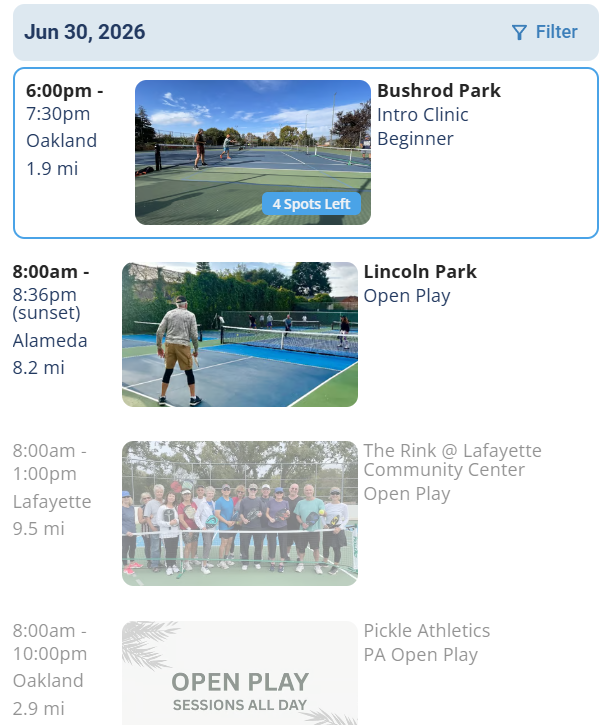
Open Play sessions from across the community, all on the universal DailyPB calendar.
Benefits of DailyPB-managed Open Play
Why use DailyPB for Open Play? What are the benefits of running Open Play on DailyPB? How does DailyPB help with recurring sessions? What does DailyPB do for Open Play hosts? Why manage Open Play on DailyPB?
DailyPB takes the work out of organizing Open Play and keeps hosts, venues, and players in sync. Here's how:
- Save time with automated scheduling: recurring sessions refresh automatically, so your Open Play calendar stays accurate without constant updates.
- Full control and flexibility: cancel or delete individual sessions anytime without disrupting your whole schedule.
- Collaborate seamlessly: add multiple hosts to share management duties.
- Keep communication private: players can message hosts directly through DailyPB without sharing personal email addresses.
- Keep everything in one place: manage all your Open Play sessions, updates, and communication from your Host Dashboard.
- Keep your community informed: every public session appears instantly on the universal DailyPB calendar for nearby players to discover.
- Stay consistent across platforms: each session automatically syncs to its venue's calendar page, which has its own public web address for sharing and embedding.
- Adapt to outdoor conditions: sessions can be set to end at sunset, keeping daylight schedules accurate automatically.
How to create a recurring Open Play session
How do I create a recurring Open Play? How do I set up weekly Open Play? How do I make a repeating session? How do I create recurring sessions? How do I set up an Open Play that repeats every week?
Open Play is just a recurring session. To set one up, follow the full walkthrough in Creating Recurring Sessions: choose Open Play as the session type, then enable recurring in the session's Advanced Setup.
FAQ
Why do I only see 6 months of recurring sessions? How far out does Open Play generate? Will recurring Open Play use my updated time when it regenerates? What happens if I delete all my upcoming Open Play sessions? Does Open Play keep generating forever?
Why do I only see 6 months of recurring Open Play sessions? For recurring Open Play, DailyPB auto-generates six months of weekly sessions. At the five-month mark, it adds another six months, continuing indefinitely.
If I update the Open Play time, will the regenerated sessions use the new time? When you change the time on a recurring session, DailyPB asks how far the change should apply: just this session, or this and all following sessions. Choose this and following sessions and the new time carries forward to the regenerated sessions. For the full walkthrough, see Changing the Time or Date of a Session.
If I delete all the upcoming sessions of a recurring Open Play, will it keep auto-generating? No. When you delete a recurring session, you choose whether to delete just that one or this and all following sessions. If you delete all the future sessions, the recurring Open Play ends and won't keep generating. For the steps and the full picture, see Deleting Sessions or Events.