Removing a Player
As a host, you can remove any player from one of your sessions. This is how you take someone out of a session you're hosting, whether they asked to be removed, signed up by mistake, or can no longer make it. If the player already paid, removing them also opens your refund options.
How do I remove a player from my session? How do I take a player out of a session? How do I delete a signup? How do I cancel someone's spot? How do I remove an attendee? Can a host remove a player? How do I kick a player from a session?
- You must be a host of the session.
- You can only remove a player from the session detail view, by opening the attendees list.
- The reason you enter is included in the cancellation confirmation email the player and host receive.
How to remove a player from a session
How do I remove a player from my session? Where is the remove button? How do I delete a player's signup? How do I take someone off the attendee list? How do I remove an attendee from a session? What are the steps to remove a player?
1 Open the session and click "View Attendees"
Open the session, then click View Attendees to open the Signups window. (The View Attendees button only shows up when at least one person is attending.)
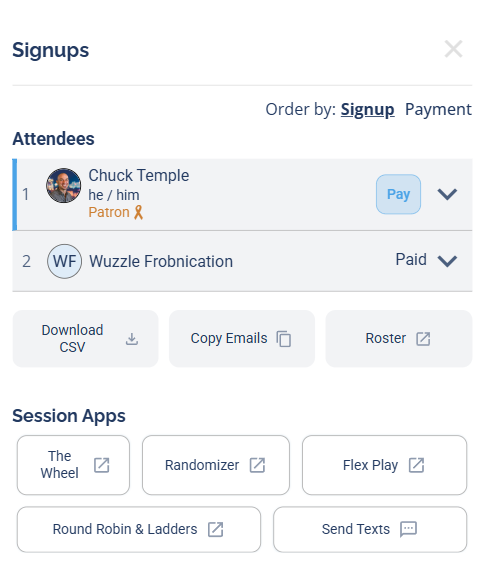
The Signups window. Each attendee row has a chevron (⌄) on the right that opens their actions.
2 Open the player's actions and click "Delete"
In the Signups window, click the chevron (the ⌄ arrow) on the right of the player's row to open their Actions, then click Delete.
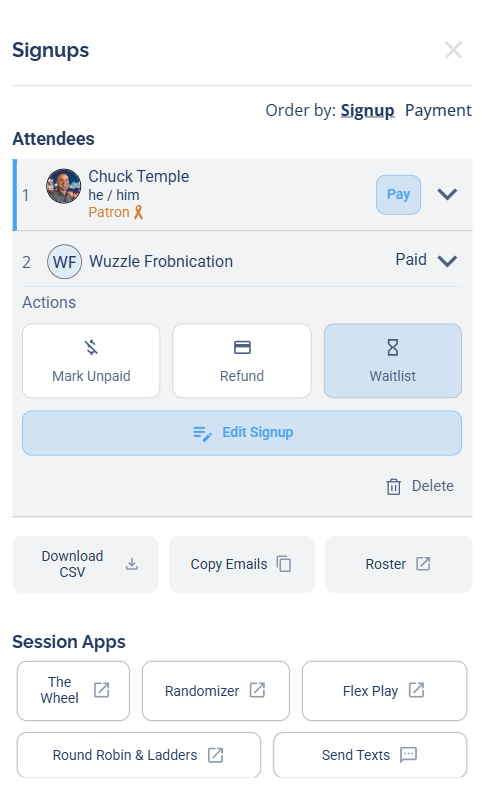
Click the chevron on the player's row, then click Delete. (A paid player's menu also shows Mark Unpaid, plus a Refund option if they paid by credit card.)
The actions available depend on the player's payment status. A paid player shows Mark Unpaid (and, if they paid by credit card through automatic payments, a Refund option); an unpaid player shows Mark Paid. A player who paid by a manual method has no Refund button — there's no card charge for DailyPB to reverse. Delete is always there — that's the one that removes them.
Click the chevron specifically. Clicking the player's name or photo opens their profile instead of the actions menu.
3 Confirm the removal
The Remove Player screen opens. You can add an optional Reason for Removal — this reason is included in the cancellation email that both the player and the host(s) receive. Click Remove Player to finish.
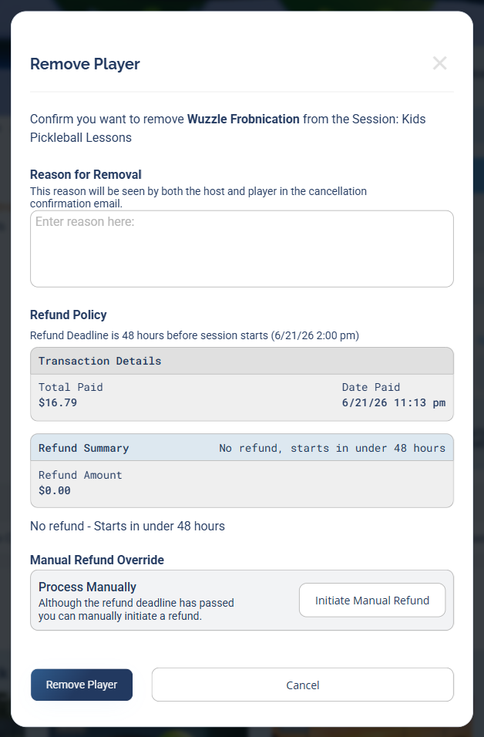
The Remove Player screen. If the player paid through Stripe, a Refund section appears here too (see below).
The player disappears from the attendee list right away and their spot opens back up. If the session was full and has a waitlist, you decide whether to fill the open spot from it — see below.
The player vanishes from the list the moment you confirm, while the removal finishes in the background. Don't click remove again — one click is enough.
The player and host receive a cancellation confirmation email, and whatever you type in the Reason for Removal box is included in it.
What happens to the waitlist when you remove a player
Does removing a player promote the waitlist? When I remove a player does the next person get bumped up? Do I have to promote the waitlist when I remove someone? Can I remove a player without promoting the waitlist? Does the waitlist fill automatically when a host removes a player? How do I open a spot without filling it from the waitlist?
Removing a player as the host is a manual action, so it doesn't auto-promote the waitlist. Instead, you choose whether to fill the open spot from the waitlist on the Remove Player screen. This is different from when a player cancels their own spot — that does automatically promote the first person on the waitlist.
So as a host you stay in control: you can open a spot and leave it open, fill it from the waitlist, or add a specific player yourself.
- A player cancels their own spot → the first person on the waitlist is automatically promoted.
- You remove a player → you decide whether to promote the waitlist. Nothing is auto-promoted unless you choose it.
What happens to the player's payment when you remove them
If I remove a player do they get refunded? Does removing a player refund their money? What happens to the payment when I remove someone? Do I have to refund a removed player? How do refunds work when I remove a paid player? What happens to a manual payment when I remove a player? Can I remove a player without refunding them? How do I disable or turn off the automatic refund? Can I keep the payment when I remove someone? Can I stop a refund from going out?
What happens to the money depends on how the player paid.
Players who paid through Stripe (automatic payments)
If the session uses automatic (Stripe) payments and the player has a paid balance, the Remove Player screen shows a Refund section with the transaction details (what they paid and when). You have full control over what happens to that payment — the screen suggests a default based on your refund deadline, but you can always override it.
The default the screen suggests depends on your refund deadline (set by you, 48 hours before the session by default):
- Inside the refund deadline (the session is starting soon), the default is "No refund" / $0.00 — the player gets nothing back and you keep the payment.
- Outside the refund deadline (the session is further out), the default is to refund the player the amount they're due.
But you decide. Two overrides put you in charge regardless of the default:
- Disable the refund. Even when you're outside the deadline and the screen wants to refund the player, you can turn the refund off so the money stays put. This is handy when you're moving them to another session — keep the payment, then just Mark Paid on the new one instead of refunding and re-charging.
- Refund them manually. Even when the default is "No refund," the Manual Refund Override lets you issue a refund yourself with Initiate Manual Refund.
The refund deadline only sets the suggested default. On the Remove Player screen you can refund a player who'd get nothing automatically, or keep the payment of a player who'd otherwise be refunded. The choice is yours.
If you don't sort it out at removal, you can still refund later: removed players stay flagged on your Dashboard and Signups page, and you can refund them from their payment record. See Refunds for the full details on how refunds are calculated and issued.
Players who paid manually (Venmo, Cash App, cash, etc.)
If the session uses manual payments, DailyPB only tracked the payment — no money was processed through the platform, so there's nothing for DailyPB to refund. If you owe the player money back, settle it directly the same way they paid you (Venmo, Cash App, cash, etc.).
When you remove a player, their payment transaction is removed from the session's records along with them.
Removing yourself from your own session
How do I remove myself from my own session? Can a host leave their own session? How do I cancel my own spot as the host? I'm the host and signed up, how do I take myself out?
If you're the host and you also signed yourself up, you remove yourself the same way: open View Attendees, click the chevron on your own row, and click Delete. Because it's your own spot, the confirmation screen is titled Cancel My Spot Confirmation instead of Remove Player, but it works the same way.
Common questions about removing players
Can I undo removing a player? Is removing a player reversible? Does removing a player free up the spot? What's the difference between removing a player and moving them? Should I remove a player or move them to the waitlist? Can I add a removed player back?
Removing a player isn't a toggle you can switch back. If you removed someone by mistake, you can add them back manually — their spot is open again as soon as they're removed. Keep in mind their payment doesn't come back with them: their transaction was removed, so a player who had paid through Stripe returns as unpaid and would need to pay again (or be marked paid).
- Moving them to a different session? Use Moving a Signup instead — it carries their payment over.
- Just freeing a spot temporarily? Consider the waitlist instead of removing them outright.