Delete Sessions or Events
How do I delete a session? How do I remove an event? How do I delete a recurring session? How do I delete all future sessions? How do I permanently remove a session? What's the difference between cancelling and deleting? How do I undo a deleted session?
Deleting permanently removes a session from DailyPB. If you only want to call off a session but keep its record and signups, cancel it instead.
A deleted session is gone for good, and signups are not notified of the deletion — message them first if anyone has signed up.
How to delete a session
How do I delete a single session? How do I remove one session? Where is the delete button? How do I permanently delete a session? How do I confirm a delete?
1 Open the session's Tools
Open the session you want to delete and scroll down to the Tools section. Click Cancel or Delete.
2 Choose to delete
In the Manage Session Status window, click Delete and Remove Session.
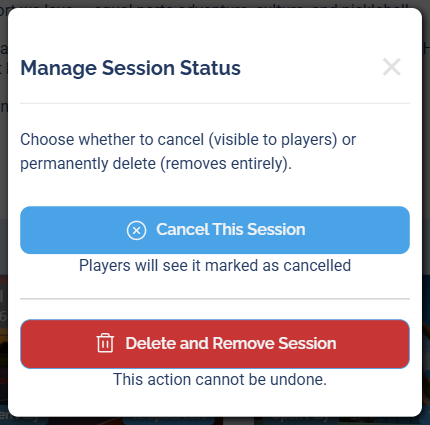
Choose Delete and Remove Session to permanently delete (or Cancel This Session to keep it but mark it cancelled).
3 Confirm
On the Delete Session Confirmation screen, confirm the session shown is the right one, then click Yes, Delete.
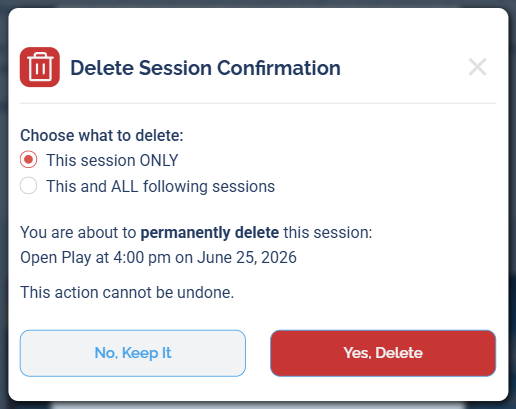
The confirmation screen. For a recurring session, you'll also choose the scope (see below).
Deleting a recurring session
How do I delete a recurring session? How do I delete all future sessions in a series? How do I delete just one session from a recurring event? How do I remove the whole series? Can I delete only one occurrence? How do I stop a recurring session from repeating? Does deleting one session stop the recurrence? How do I delete a recurring session on certain days only?
When the session you're deleting is part of a recurring event, the confirmation screen gives you a Choose what to delete option:
- This session ONLY — deletes just this one occurrence and leaves the rest of the series in place.
- This and ALL following sessions — deletes this session and every future one in the series.
Pick the scope you want, then click Yes, Delete. The signup and payment consequences below apply to every session you delete, so if you delete the whole series, message the signups across all of those future sessions first.
Deleting (or cancelling) a single session leaves the rest of the recurring series intact — it keeps generating new sessions as normal. To actually stop the recurrence, delete This and ALL following sessions.
Stopping the recurrence going forward
Choosing This and ALL following sessions ends the recurrence from this point on — DailyPB stops generating future sessions for that schedule.
If your event recurs on more than one day of the week, you'll see a day selector so you can choose exactly which days to stop:
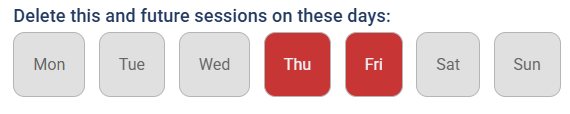
For a multi-day series, pick which days to stop. Only the days you select (highlighted in red) stop recurring going forward — any days you leave unselected keep generating sessions.
Click Yes, Delete to confirm. (For more on how recurring series work, see Creating Recurring Sessions.)
What happens to signups and payments
What happens to signups when I delete a session? Can I still see who signed up after deleting? Do players get refunded when I delete a session? What happens to payments when I delete a session? Are signups notified when I delete?
Signups
Signups are not notified when you delete a session, so it's best to message them beforehand. After deletion, you can still view that session's signups from the Host page under the Signups tab — deleted signups are highlighted in red so you can tell they belonged to a deleted session.
Payments
- Automatic (Stripe) payments — transactions stay in your Finance dashboard, and you can still issue refunds from there even though the session is gone.
- Manual payments — if you delete the session before it starts, those transactions are removed and you won't owe DailyPB fees on them. Transactions from sessions that have already happened stay on record even after deletion.