How to Become a Free Agent for a Session
When you want to play in a Team Session but don't have a team yet, you can list yourself as a free agent. This puts you in a pool of available players that team captains can browse and pick from when filling their rosters. It's a great way to get into a session and meet new players.
How do I become a free agent?
How do I become a free agent? How do I sign up as a free agent? How do I list myself as available for a team? I don't have a team but want to play, what do I do? How do I get picked up by a team? How do I join the free agent pool? How do captains find players without a team? What is the free agency public message? Who can see my free agent message? How do I write a good free agent note to get chosen? How do I edit or remove myself from the free agent list?
You become a free agent from the Teams view of the session you want to play in.
1 Open the Teams view
From the session page, click the Join or Create Team button. The Teams modal opens, where you'll see every team and your options.
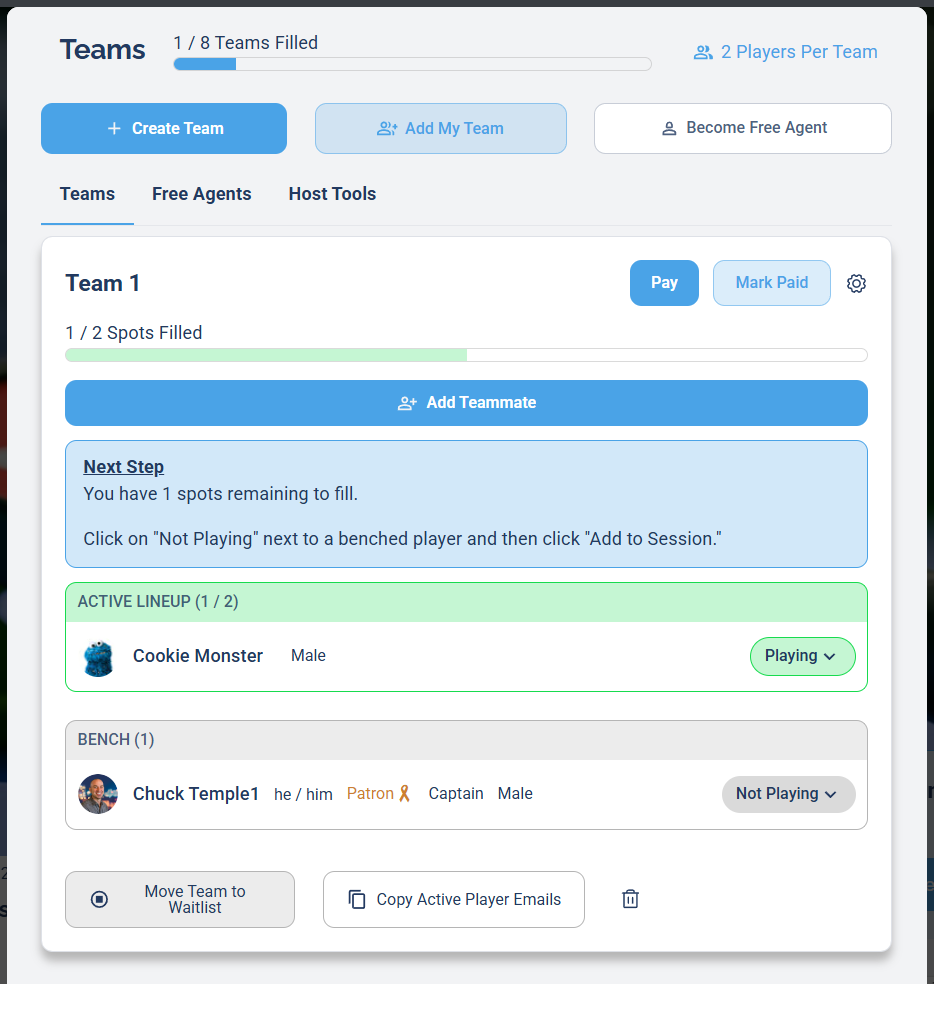
Use the Become Free Agent button at the top of the Teams modal.
To become a free agent you must not currently be playing in the session. If you're already in the lineup, click Remove From Session first, then become a free agent.
2 Click Become Free Agent
At the top of the Teams modal, click the Become Free Agent button.
3 Fill out the Additional Info form
The Additional Info pop-up appears. Fill in your details, then click the Become Free Agent button at the bottom.
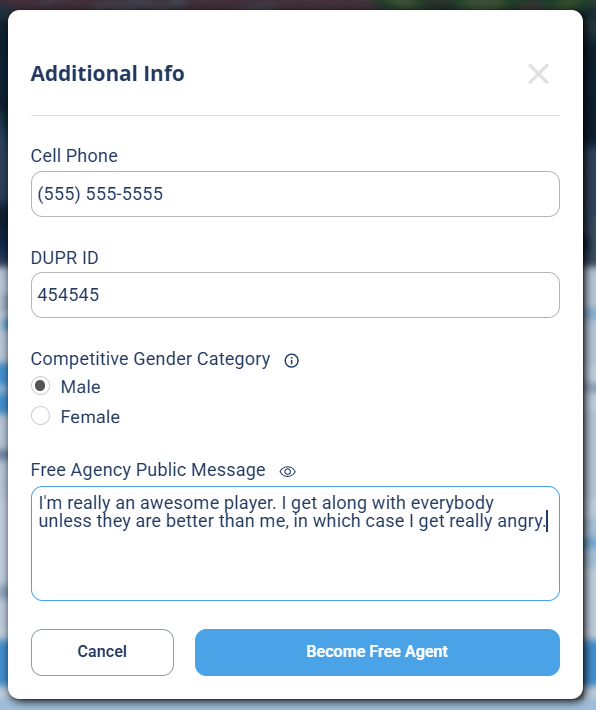
Fill in your info, add a public message, then click Become Free Agent.
- Cell Phone so captains can reach you
- DUPR ID, your DUPR rating ID, if you have one
- Competitive Gender Category, Male or Female
- Free Agency Public Message, a short note captains will see
The Free Agency Public Message is visible to everyone browsing the free agent list, so it's your chance to get picked. Keep it short and friendly, like "Choose me, I'm fun to play with!", "Looking for a competitive team!", or "Happy to fill in wherever needed."
4 Confirm you're listed
After submitting, you'll appear under the Free Agents tab, and the tab shows a count next to it (for example, Free Agents (1)). Your public message shows right below your name for captains to read.
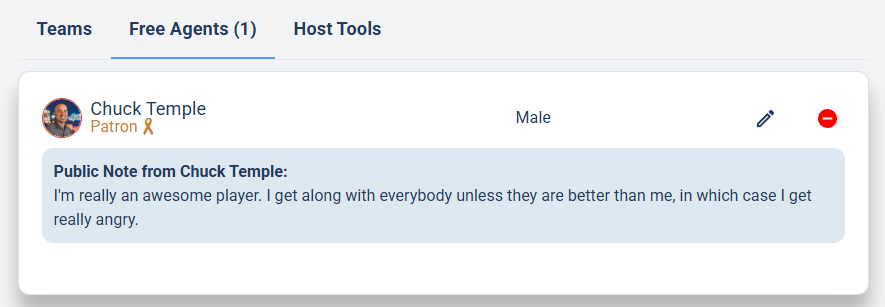
You're listed. Use the pencil to edit your info, or the red button to remove yourself.
From this same screen you can update your details any time with the pencil (edit) icon, or take yourself out of the pool with the red minus button next to your name.
What happens after I become a free agent?
What happens after I become a free agent? Do team captains get notified about free agents? How do I know if a team picked me? How do I edit my free agent message? Will I get an email when a captain adds me?
Once you're listed:
- Team Captains are notified by email that a new free agent is available.
- If a captain adds you to their team, you'll get a notification.
- You can edit your information any time by clicking the pencil (edit) icon next to your name in the Free Agents list.
Common questions
How do I become a free agent? How do I list myself as available for a team? I don't have a team, how do I join a session? How do team captains find me? Can I be a free agent for more than one session? How do I remove myself from the free agent list? What if no one picks me? Does joining a team in one session affect another session? How do I edit my free agent info?
Can I be a free agent for more than one session? Yes. You register as a free agent separately for each session you want to join.
Can I remove myself from the free agent list? Yes. Click the red minus button next to your name in the Free Agents list to remove yourself.
What if no one picks me? If you're not selected for a team, you can create your own team or reach out to the session host for help getting placed.
Can I edit my information after submitting? Yes. Click the pencil (edit) icon next to your name in the Free Agents list to update your information or message.
Does becoming a free agent stop me from playing on a team? No. Even if you're on a team's bench, you can still be a free agent until you're actually activated to play for a team. Once you're playing for a team, your free agency for that session is removed.
If a captain adds me to a team in one session, does it change my free agent status in other sessions? No. Each session's free agent list is independent. Being added to a team in one session has no effect on any other session.