Can I make a Session private or in a "draft" mode?
Can I make my session private? Can I make my event private? How do I set up a session in draft mode? How do I set up an event in draft mode? How do I hide a session while I work on it? How do I hide an event until it's ready? Can I create a draft session or draft event? How do I make a session only I can see?
Yes. Set the visibility to Private and don't link a group, and then only the Session hosts can see it. That effectively gives you a draft mode: set the session up privately, then make it Public when you're ready to announce it.
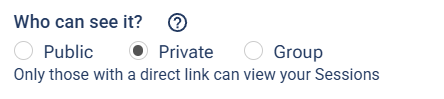
Set "Who can see it?" to Private and leave the group unlinked.
A Private session stays off the public schedule, group pages, and venue pages — but anyone you give the direct link to can still open it. For a true draft, just don't share the link until you're ready.
For the full walkthrough of where this setting lives and what each privacy level does, see Privacy Settings.