Cancelling a Session
How do I cancel a session? How do I call off my event? It's raining, how do I cancel today's session? How do I cancel without deleting the session? How do I tell players a session is cancelled? How do I cancel and email everyone who signed up? How do I post a reason for cancelling? How do I mark a session as cancelled?
If this is a Session with many Signups, consider simply updating the date or time of the Session and notifying Signups. This leaves all your Signups intact.
Cancelling keeps the Session and its Signups — players see it marked as cancelled, and you can reverse it with Un-Cancel This Session. Deleting removes the Session permanently and cannot be undone. This article covers cancelling.
How to Cancel a Session
How do I cancel a session? How do I call off my event? How do I mark a session as cancelled? How do I post a public reason for cancelling? How do I cancel and email everyone who signed up? Should I cancel or delete my session? What's the difference between cancelling and deleting a session?
1 Open the Cancel or Delete tool
Open the Session, scroll down to Tools, and click Cancel or Delete.
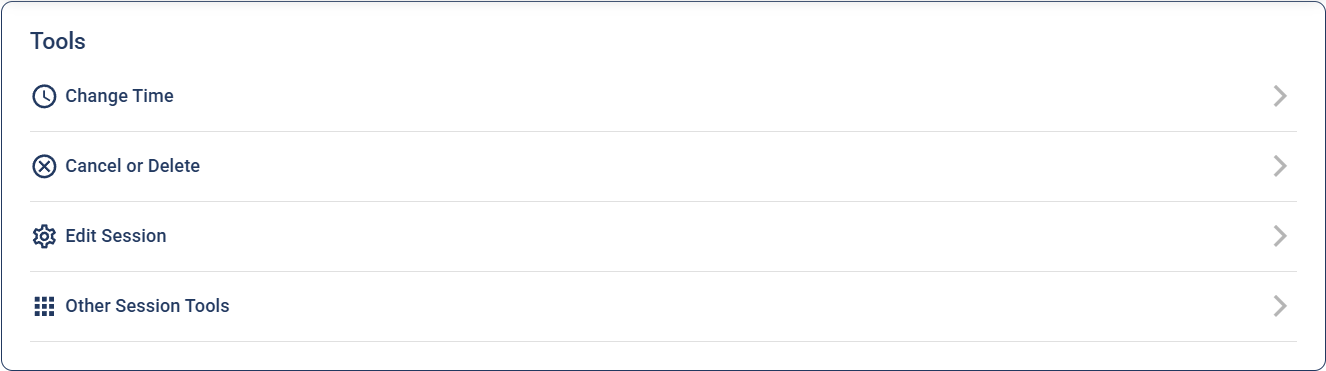
2 Click "Cancel This Session"
In the Manage Session Status window, click Cancel This Session. The Session is now marked as cancelled, and players will see it as cancelled.
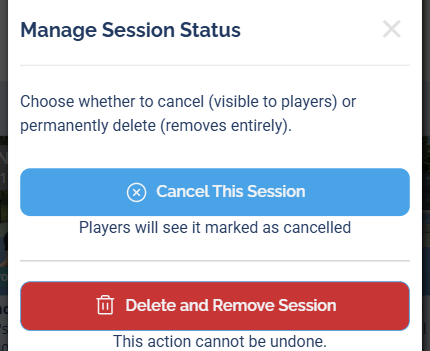
3 Add a reason and email everyone (optional)
Once the Session is cancelled, the Canceled Session window shows a Reason for cancellation box. Type a reason (players see it publicly) — or leave it blank.
If the Session has players signed up, a checkbox labeled "and email signups regarding cancellation/reason" appears below the Submit Reason for Cancellation button, already checked. Leave it checked to email everyone who signed up that the session is cancelled (including your reason, if you typed one), or uncheck it to skip the email. A Session with no signups won't show this checkbox — there's no one to notify.
Click Submit Reason for Cancellation once to save the reason and send the email (if checked).
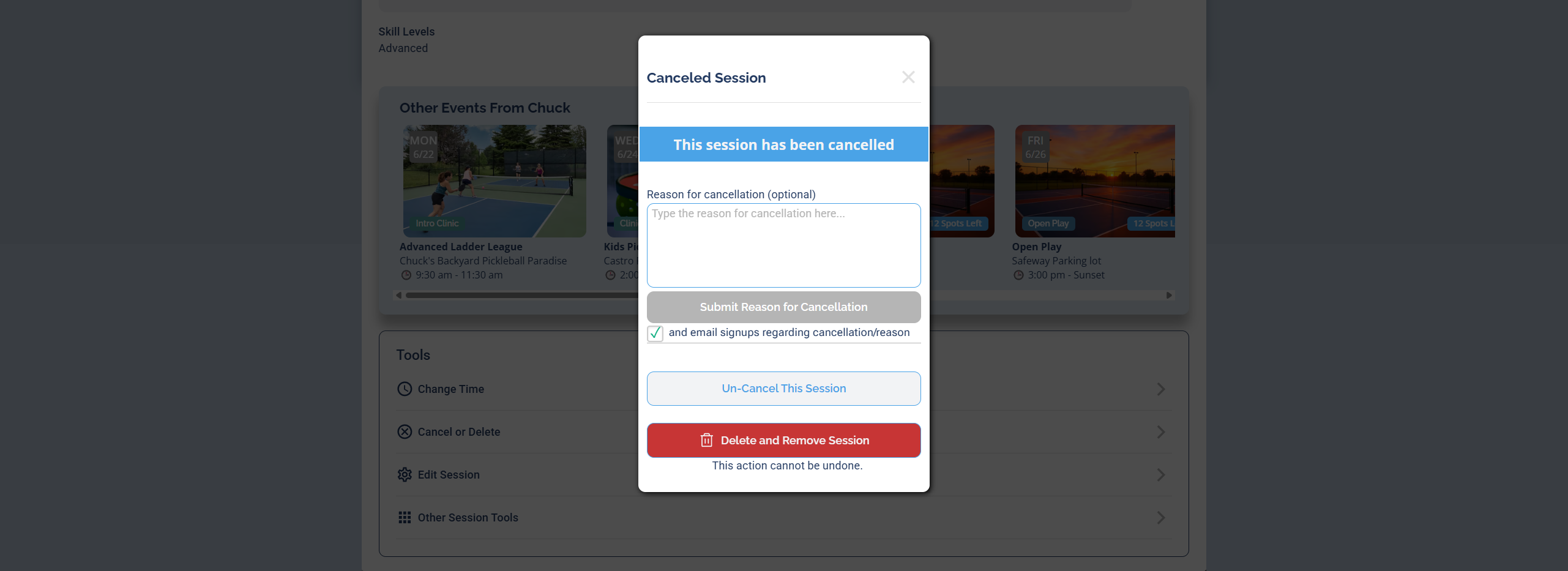
In the same window, click Un-Cancel This Session to reverse the cancellation.
Other things that happen when a Session is Cancelled
What happens when I cancel a session? Do reminders still go out if I cancel? Will the waitlist still move up after I cancel? Do players still see the Join button on a cancelled session? Do pre and post emails still send after cancelling? Can people still sign up for a cancelled session?
- The 2 and 24 hour reminders (if applicable) will not go out.
- Pre and Post Templates (if applicable) will not go out.
- The waitlist will not auto-promote anyone while the Session is cancelled.
- Join Event and Join Waitlist buttons will not appear.
- On the Attendees popup, the Manually Add Attendee section will not appear.
Cancelling does not refund anyone automatically — payments stay put until you refund them. See Refunds → Payments When You Cancel a Session for the steps.
Cancelling one session in a recurring series
Can I cancel a single recurring session without cancelling all the future ones? How do I cancel just one occurrence of a recurring series? Does cancelling one session cancel the whole series? Will cancelling one session affect the rest of my recurring sessions? Can I cancel this week's session but keep the rest? How do I cancel a single date in a repeating event?
Yes — you can cancel a single session in a recurring series without touching the others. Cancelling only affects the one session you're on; the rest of the series is left in place and keeps generating future sessions as normal.
Cancelling marks that one session as cancelled and is reversible with Un-Cancel This Session. If you instead want to permanently stop the whole series from repeating, that's a delete ("this and all following sessions"), not a cancel.