Skill Level / Rating Requirements
How do I require players to enter their skill level? How do I make players add their rating at signup? Can I force players to give their skill when they join? How do I collect skill levels from players? How do I group players by ability or skill level? Where is the skill level requirement setting? Is the skill requirement the same as DUPR?
You can require players to provide their skill level or rating when they sign up, so you can group people of similar ability together. When this is on, every player must answer before they can complete their signup.
What the skill requirement collects
What's the difference between rating and recreational level? What skill formats can I collect? Where do I see players' skill levels? Is the skill requirement the same as DUPR ID? Can I require both DUPR and a skill rating? What does "player must enter skill" mean?
You collect skill in one of two formats:
- Rating — a number (for example,
3.7). - Recreational Level — a category (for example, Advanced Beginner).
Once enabled, the answer is required for all new signups. You'll see it on the attendee list, the printable roster, and the CSV export — and it's also available in most game formats, like when you're setting up a Round Robin or Flex Play, so you can group or seed players by ability.
When a player signs themselves up, any time they enter or change their rating or skill level it updates their DailyPB profile. After that, whatever's on their profile automatically pre-fills this field on future signups — so they only ever have to enter it once.
This setting collects a player's own skill level or rating. It's separate from Require players to enter DUPR IDs, a different toggle in the same section that asks for a player's official DUPR number. You can use either, both, or neither.
How to require a skill level or rating
How do I turn on the skill level requirement? Where do I set "player must enter skill"? How do I make rating required at signup? How do I enable skill input for my event? Where is the skill requirement in the editor? How do I switch between rating and recreational level? Can I require skill on just one session?
1 Open the session editor
Open the session, scroll down to Tools, and click Edit Session.
2 Open the Access section
Open the Access section and you'll see all of its options.
This is an event-wide setting, so it applies to the whole series. On a single session you just open Access and the options are right there. If your session is recurring, you'll first set the Apply changes to dropdown to This and ALL following sessions, then scroll to Session-Wide Settings and click Unlock to Edit before the Access section opens.
3 Turn on "Player must enter skill" and pick the type
Under Skill level requirement to sign up, choose Player must enter skill. A Type of skill level option appears — choose Rating (a number like 3.7) or Recreational Level (a category like Advanced Beginner). Then click Save Changes.
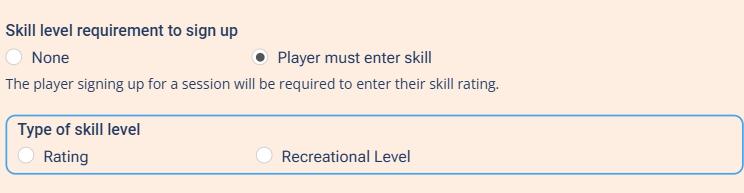
Choosing "Player must enter skill" reveals the Rating vs. Recreational Level choice.
When this is on, every new player is asked for their skill level or rating during signup and cannot complete the signup without it.
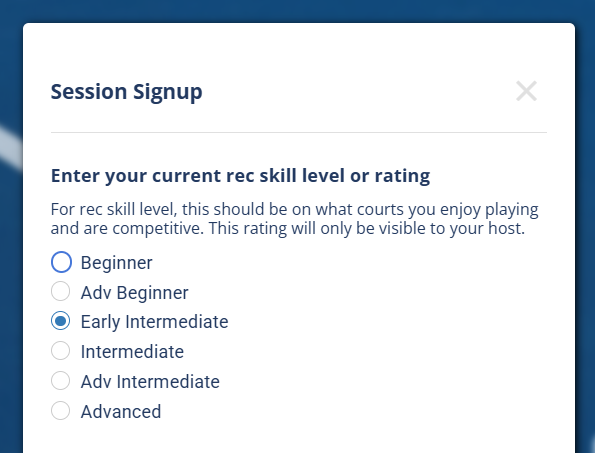
What a player sees at signup when a Recreational Level is required.
While this requirement is on, each player's rating or skill level shows on the public attendees list for the session (normally these are private). Players see how everyone is rated.
Turning this on applies to new signups only. Players who signed up before you enabled it are not retroactively forced to add a skill level. You (or they) can fill it in afterward — see below.
Editing a player's skill level for a session
Can I change a player's skill level after they sign up? How do I add a rating for someone who signed up before I required it? Does editing a player's skill level change their profile? Can a player update their rating for one session? How do I fix a wrong skill level on the attendee list?
Skill level and rating are a field on the signup itself, separate from the player's profile. That means either the player or a host can edit it for just that session — and doing so does not change the player's profile rating.
This is handy when you turn the requirement on after some people have already signed up: you can add a skill level for them on their signup, or they can add it themselves, without anyone touching their profile.
See Editing a signup for how to open and edit a signup's fields.