Notification Settings
How do I change my notification settings? How do I turn off DailyPB emails? Where are my notification preferences? How do I stop getting signup emails? How do I control which emails I receive? How do I set email vs text reminders? Where do I manage notifications?
You control which emails DailyPB sends you from the Notifications panel in your profile. There are two groups: Player Notifications (emails you get as a player) and Host Notifications (emails you get as a host).
How to open your notification settings
Where do I find my notification settings? How do I get to my notification preferences? Where is the Notifications panel? How do I open my profile settings? How do I open my profile?
1 Open your profile
Click your photo in the top-right corner to open your profile. (Clicking your name or location opens the location editor instead, so use the photo.)
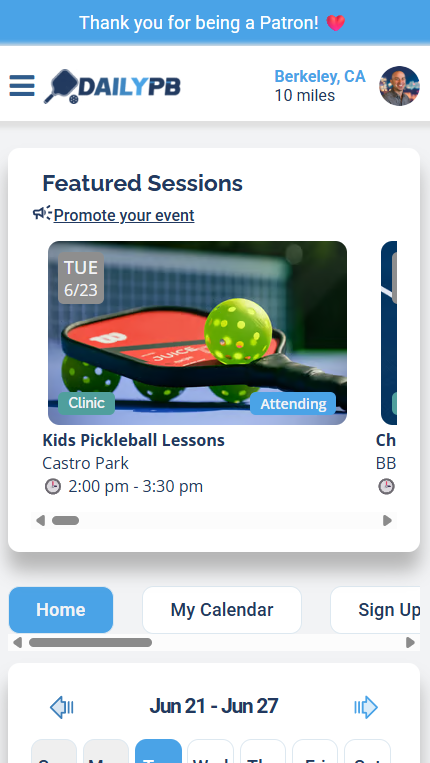
Tap your photo in the top-right to open your profile.
2 Open the Notifications section
In your profile, open the Notifications section.
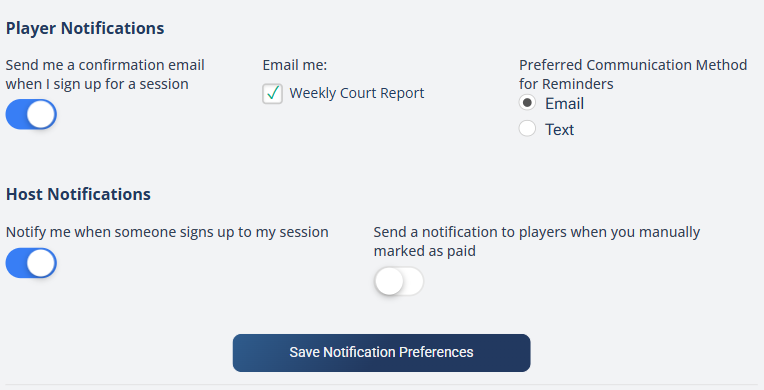
The Notifications panel, with the Player and Host notification settings.
After changing any setting, click Save Notification Preferences at the bottom of the panel — settings don't take effect until you save.
Player Notifications
How do I stop signup confirmation emails? How do I turn off the Weekly Court Report? How do I get reminders by text instead of email? How do I change my reminder method? What player emails can I control?
These control the emails you receive as a player:
- Send me a confirmation email when I sign up for a session — a toggle that emails you a confirmation each time you sign up for a session.
- Email me — a checkbox for the Weekly Court Report email.
- Preferred Communication Method for Reminders — choose Email or Text for your session reminders. Text is only available to Patrons; without a Patron subscription, reminders come by email.
Host Notifications
How do I stop getting an email every time someone signs up? How do I turn off new-signup emails as a host? Should I notify players when I mark them as paid? What does the manual-payment notification do? How do I let players know I marked them paid?
These control the emails you receive (and send) as a host:
- Notify me when someone signs up to my session — on by default. Emails you each time someone new signs up, with the signup info and the running total of players.
- Send a notification to players when you manually marked as paid — off by default. When on, it emails a player to let them know you've accepted their payment.
This only sends if the Main Host has the setting turned on. It's useful for hosts running many sessions at once, where manual payments (Venmo, Cash App, etc.) get confusing fast.
With Automatic Payments, players must pay before they can sign up, so there's nothing to mark as paid — this notification isn't needed. Players who use the Venmo link from a mobile device also get the session info auto-filled in the Venmo notes, which helps you track payments.