Liability Waiver
How do I get players to sign a liability waiver? Does DailyPB have a waiver feature? How do I add a release of liability to my event? How do I collect signed waivers from players? Can players sign a waiver when they sign up? How do I handle liability for my pickleball event?
DailyPB does not have a built-in tool for players to sign a liability waiver, so here are two practical ways to handle liability for your session.
These are best practices, not legal advice. For language you can rely on, consult an attorney.
Option 1: Add release language to your session description
How do I add a liability release to my session? How do I add a liability release to my event? Can I put waiver text in my session or event description? How do I write a release of liability for pickleball? Where do I add liability terms players agree to?
The easiest method: add liability-release text to your session description. By signing up, players see and agree to it.
You can generate this language by:
- consulting an attorney,
- adapting it from another site (still worth running by an attorney), or
- using an LLM like ChatGPT.
Release of Liability Agreement By signing up for this pickleball event, I acknowledge and agree to assume all risks associated with participation, including but not limited to injury, disability, death, or property damage. I release and hold harmless the event organizers, sponsors, hosts, volunteers, officials, venue owners, and any associated parties from any claims or liabilities arising out of my participation, including those caused by negligence. I certify that I am physically fit, will follow all event rules, and consent to medical treatment if needed. I also grant permission for the use of any photos or videos of me taken during the event for promotional purposes. By registering, I confirm that I have read, understand, and agree to these terms.
Option 2: Send a waiver link through your signup email template
How do I send players a waiver to sign? How do I use a signature service with DailyPB? How do I add a waiver link to my signup email? How do I collect signed waivers before a session? Which template sends when someone signs up?
This method collects real signatures, but requires a paid digital-signature service. The signatures live entirely in that outside service — DailyPB doesn't store them, show who has signed, or block a player from signing up without one, so you check signatures manually before each session.
1 Sign up for a signature service
Choose a digital-signature service that handles legal documents. We've used Waiverfile.com and recommend it; they offer templates designed for sports waivers.
2 Create a signup email template
On the Host page, click Templates and create a Signup template. This is the email players receive when they sign up. Customize it, and include instructions and the link to your signature service in the Message Body.
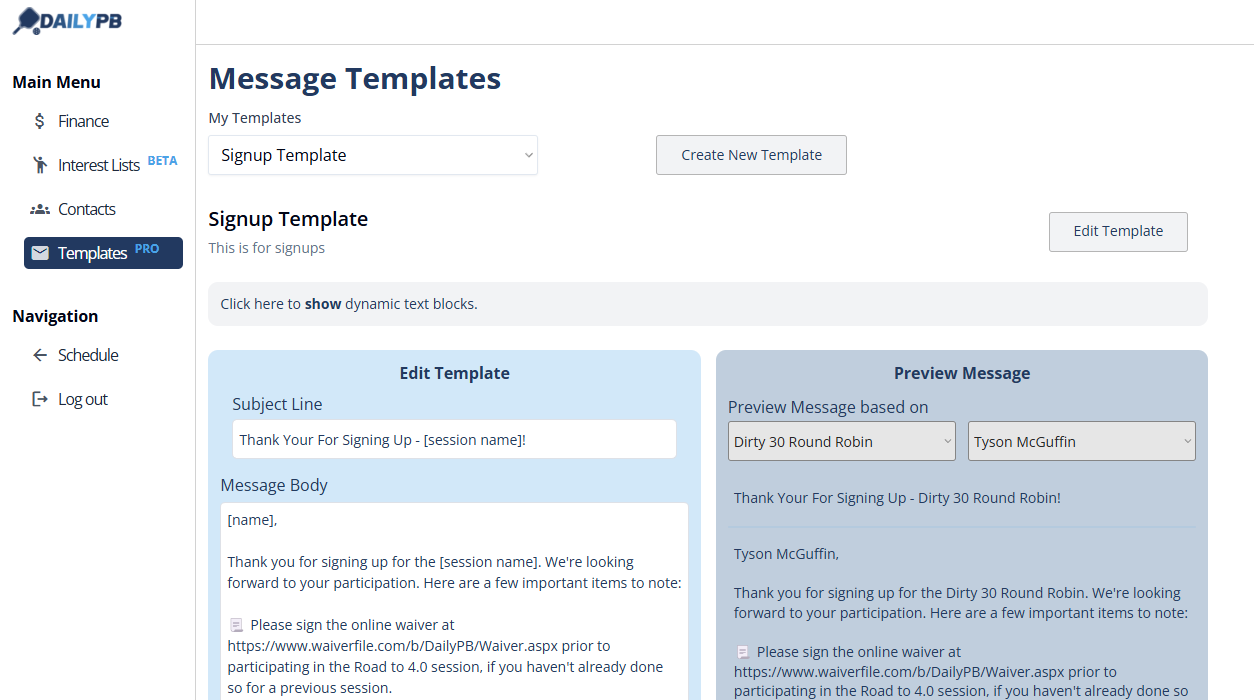
Put your signature-service link right in the message body — here, a "Please sign the online waiver at..." line that every signup will receive.
3 Link the template to your session's signups
Open the session, scroll to Tools, click Edit Session, and open the Automation section. (If your session is recurring, first set Apply changes to → This and ALL following sessions, open Session-Wide Settings, and click Unlock to Edit. On a single session, the Automation options are right there.) Under What templates should we use for emailing signups?, set the As soon as they sign up for a session template to the one you created.
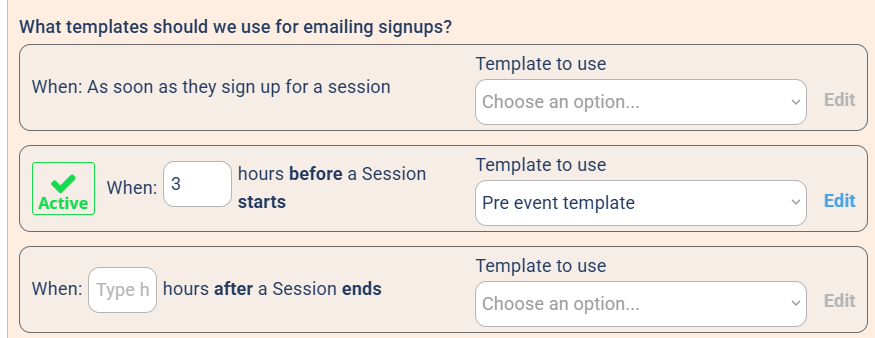
Link your template to the "As soon as they sign up" slot under Automation.
4 Check signatures before the session
Before your session starts, cross-reference your session signups against the signatures in your signature service. Contact anyone missing a signature ahead of time, or have them complete it before they play.