Finding Your DUPR ID
Some sessions submit game results to DUPR, and when you sign up for one you'll be asked for your DUPR ID. This is a short code that comes from your DUPR account, not from DailyPB. Here's how to find it, and where to save it in DailyPB so you only have to enter it once.
Jump to:
What is a DUPR ID?
What is a DUPR ID? What does a DUPR ID look like? How long is a DUPR ID? Where does my DUPR ID come from? Why does DailyPB ask for my DUPR ID? Is my DUPR ID from DUPR or DailyPB?
A DUPR ID is a short 6-character code (a mix of letters and numbers, like 8DPLX8) that identifies you in DUPR (Dynamic Universal Pickleball Rating), the rating system many pickleball players use to track their skill.
It comes from your DUPR account, not from DailyPB. DailyPB only asks for it when a session runs in DUPR mode, so your games get reported to DUPR under the right player.
Find your DUPR ID on the DUPR website
Where is my DUPR ID? How do I find my DUPR ID? Where is my DUPR ID on the website? How do I find my DUPR ID on a computer? Where is my DUPR ID at mydupr.com? How do I copy my DUPR ID? Where is my DUPR number?
The easiest way to find your DUPR ID is on the DUPR website.
- Log in at mydupr.com.
- Your DUPR ID is right on the main dashboard, directly below your name (it looks like
ID: 8DPLX8), with a copy icon next to it. You don't need to open anything else.
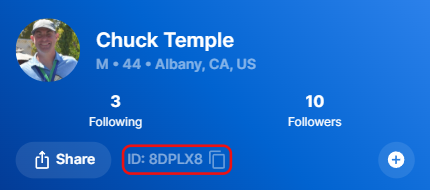
Your DUPR ID sits right under your name on your DUPR dashboard. Click the icon beside it to copy it.
Don't have a DUPR account yet?
How do I get a DUPR ID? How do I create a DUPR account? I don't have a DUPR ID, how do I sign up? Where do I make a DUPR account? How do I join DUPR?
If you don't have a DUPR ID yet, you need a DUPR account first. You can create one at mydupr.com. Once your account is set up, your DUPR ID is available right away using the steps above.
Save your DUPR ID in DailyPB
Where do I put my DUPR ID in DailyPB? How do I save my DUPR ID so I don't have to enter it every time? Where is the DUPR ID field in my DailyPB profile? How do I add my DUPR ID to my account? How do I update my DUPR ID on DailyPB?
Once you have your DUPR ID, save it to your DailyPB profile so it pre-fills automatically whenever a session asks for it.
- Click the profile icon in the top-right corner to open your profile.
- Expand the Ratings section, type your ID into the DUPR ID field, and click Save Ratings.
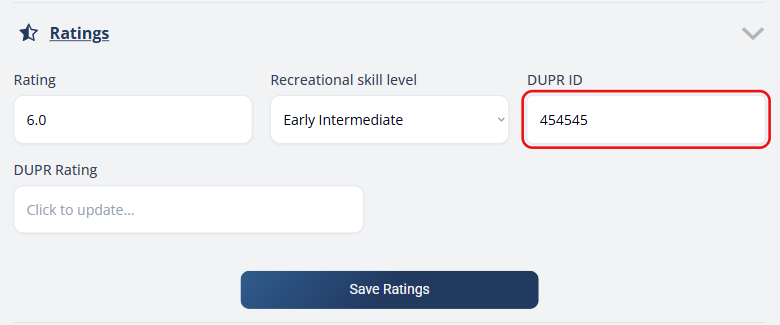
Enter your DUPR ID in the Ratings section of your profile and click Save Ratings.
The DUPR ID field lives in your profile's Ratings section, alongside your Rating, Recreational skill level, and DUPR Rating. For a full tour of every profile section, see Profile.