Location and Search Radius
Your Location and Search Radius control which sessions DailyPB shows you. Together they tell DailyPB to show you the pickleball sessions that are local to you. You can see your current settings at the top of the main Schedule page.
If you're seeing sessions for the wrong city, or a session you expected isn't showing up, it's almost always because your location or search radius needs updating. Here's how to fix it.
How do I update my Location or Search Radius?
How do I change my location? How do I update my location on DailyPB? How do I update my search radius? How do I find sessions near me? Why can't I find a session? Why isn't a session showing up for me? Why am I seeing the wrong city? Why am I seeing sessions in the wrong location? My location is wrong, how do I fix it? Why am I seeing sessions far away? How do I see sessions in a different city? How do I see sessions when I travel? How do I change how far DailyPB searches? How do I widen my search radius? How do I set my zip code? Sessions aren't showing up near me, what do I do? I moved, how do I update where DailyPB shows me sessions? Why is my Weekly Court Report showing the wrong area? How do I change what sessions are in my weekly email? Does my location affect my Court Report?
1 Open your Location Preferences
Click your Location or Search Radius at the top of the Schedule page to open the Location Preferences.
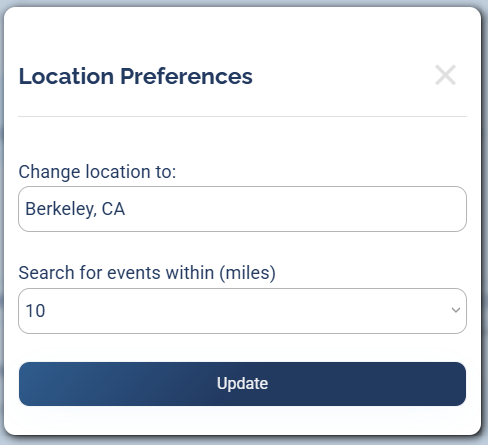
Location Preferences: set your location and how far out to search, then click Update.
2 Enter a new location
Type any location (a city or a zip code) in the Change location to field.
3 Adjust your search radius
To change how far out DailyPB searches, use the Search for events within (miles) dropdown and pick a distance.
4 Update
Click Update. Your new location and search radius appear at the top of the Schedule page, and the sessions list updates to match.
💡 It also tunes your Weekly Court Report Your location and search radius do more than filter the schedule. The Weekly Court Report, the email of upcoming sessions DailyPB sends each week, uses the same search radius to decide which sessions to include, so keeping it current means your report features the sessions in your area. Learn more in How DailyPB Advertises Your Event.