How to Pay for a Session
How you pay depends on your situation. Find yours below and jump to that section:
- Signing up for a session? See Paying when you sign up.
- Got a message to pay after being moved off the waitlist? See How do I pay when I've been bumped up from the waitlist?.
- Paying for a friend or another player? See Paying for someone else.
If you ever can't find a way to pay, jump to Why can't I find a way to pay?.
Paying when you sign up
How do I pay for my session when I sign up? When do I pay for a session? Do I pay when I sign up? How do I pay online? How do I pay the host with Venmo or Zelle? I signed up but how do I pay? Why didn't I have to pay when I signed up? Do I pay cash at the venue?
The short version: just follow the instructions on the screen as you sign up. The signup process walks you through it, and there's nothing special you need to do beyond reading what it shows you. Depending on how your host set things up, one of two things happens:
- You're sent to Stripe to pay up front. Signing up and paying are the same step, so you finish signup already paid.
- You sign up first, then get a link or instructions to pay the host. After you sign up, the screen shows you how the host wants to be paid (for example a Venmo or Zelle link). If you close it before paying, open the session again and the host's payment details are right there.
How do I pay when I've been bumped up from the waitlist?
How do I pay when I've been bumped up from the waitlist? How do I pay after being bumped from the waitlist? I got a text or email to pay, what do I do? I was asked to pay for a session, how? How do I pay for a spot I just got off the waitlist? Why am I being asked to pay when I already signed up? How do I pay if I'm not logged in?
If you signed up to a waitlist and a spot opened, you get moved into the session and may be asked to pay. You'll usually get a text or email about it. To pay:
- If your host collects online: make sure you're logged in, and a Pay Here button appears right on the session details. Click it to pay. If you're not logged in, go to View Attendees and find your name (see Paying for someone else).
- If your host collects directly: open the session; its details show the price and the host's payment info (Venmo, Zelle, and so on), and you pay the host from there.
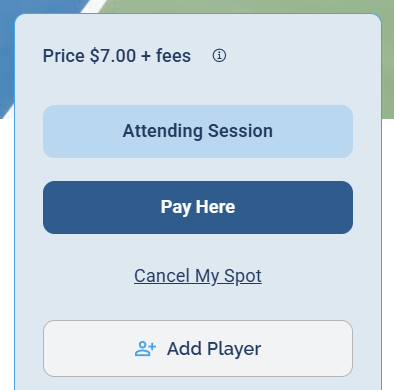
When you're logged in and still owe, the Pay Here button shows on the session details.
Paying for someone else
How do I pay for someone else? How do I pay for another player? How do I pay for a friend's spot? Can I pay for my partner's session? How do I pay for another person's signup? How do I pay if I'm not logged in? Can I pay for someone without an account?
You can pay for any player from the attendee list, and you don't even have to be logged in to do it:
1 Open the session.
2 Click View Attendees to open the attendee list.
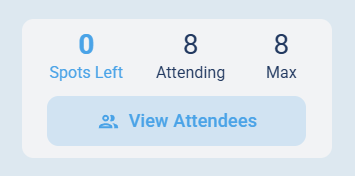
Click View Attendees on the session.
3 Find the person's name and click the Pay button next to it.
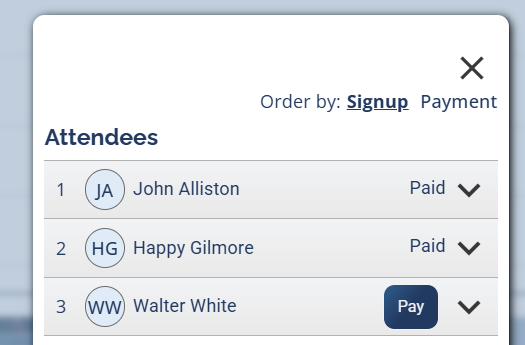
A Pay button appears next to anyone who still owes.
Because the Pay button sits next to each name, anyone can pay for anyone, which makes this a reliable fallback whenever you're not sure how else to pay (including paying for your own spot).
Why can't I find a way to pay?
Why can't I find the pay button? Where is the Pay button? I can't find how to pay. Why don't I see a way to pay? I signed up but can't find how to pay. Why are there no payment options on my session? Why isn't my name in the attendee list? Did I sign up with the wrong account?
If none of the above worked, here's what's usually going on:
- You're not logged in (and need to be for this session). You can tell you're logged in when your name shows in the top-right corner. For paying another person from the attendee list you don't need to log in, but for your own spot you sometimes do.
- Your name isn't in the attendee list. You probably signed up with a different account. The most common version: you signed up with Google but are now trying to log in with an email and password (or the other way around). You have to sign in the same way you signed up. When you're on the right account and signed up, the session shows Attending Session and Cancel My Spot. Find your signup confirmation email; the address it went to is the account you used.
- Your host collects payment directly. If there's no Pay button anywhere, the host likely uses Venmo, Zelle, or similar. Look on the session details for their payment information instead.
- Still stuck? Message your host through the session and they can sort out the payment.