How to Sign Up for a Session
Signing up for a session takes about a minute: sign in, open the session, and click Join Session. If you're stuck — or you don't see a signup button at all — jump to Why can't I sign up?.
How to sign up
How do I sign up for a session? How do I join a session? How do I register for a pickleball session on DailyPB? Where is the Join Session button? How do I reserve a spot in a session? Do I need an account to sign up for a session? How do I sign up for a pickleball event? How do I get into a session I found on the schedule?
1 Sign in to DailyPB
You need to be signed in to sign up. Click Sign in at the top of the page. If you don't have an account yet, use Create a new account on the sign-in screen — it's free.
2 Open the session
Find the session on the schedule, on a venue or group page, or through a link someone shared with you, and click it to open its details.
3 Click Join Session
In the box with the price and the Spots Left counter, click Join Session and follow the instructions on the screen. That's it — once you're in, the session shows Attending Session with a Cancel My Spot button.
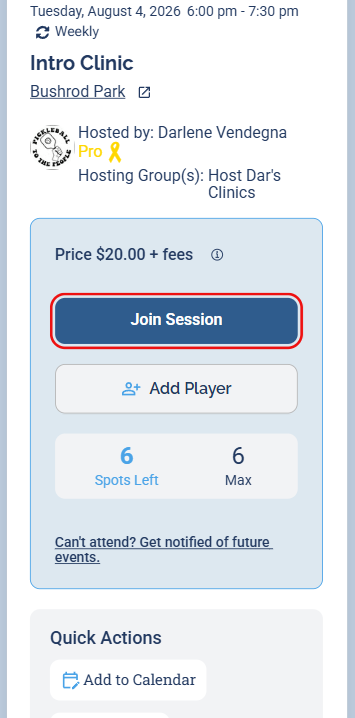
When you're signed in, the Join Session button sits right under the price.
Why can't I sign up?
Why can't I sign up? I can't sign up. I can't signup. I can't sign up for a session. I can't sign up and I don't see the button. I don't see the signup button. I don't see a button to sign up. Where is the signup button on a session? There's no Join Session button on the session. Why does the button say Sign In To Join? The session won't let me sign up. The session is full, can I still sign up? Why is there no way to sign up for this session?
Work down this list — it's ordered from most to least common.
1 You're not signed in
This is the most common reason by far. When you're logged out, the signup button doesn't say Join Session — it says Sign In To Join. Sign in first, and it changes to Join Session so you can sign up.
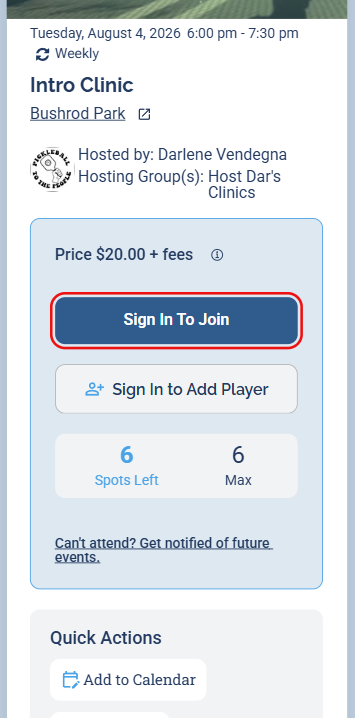
Logged out, the button says Sign In To Join. Sign in and it becomes Join Session.
2 The session is full
Sessions have a fixed number of spots — the Spots Left counter on the session shows how many remain. If the signup button says Join Waitlist, the session is full — but you can still get in line.
3 You're already signed up
If the session shows Attending Session and Cancel My Spot instead of a Join button, you're already in — there's nothing more to do. (If you're trying to get out of the session, see How to Cancel Your Spot.)
4 The session doesn't take signups
Some sessions — often casual drop-in open plays — don't use signups at all. There's no signup button and no Spots Left counter on the session, just the details, price, and payment info. Nothing is wrong: there's simply nothing to sign up for. Check the session details for the price and how to pay, and just show up.
5 Still stuck?
Message the host right from the session — open it and click Message Host (or Message Hosts) in the Quick Actions row. Or contact us:
- Email: chuck@dailypb.com
- WhatsApp: https://bit.ly/chuckt